If you are looking up how to change name in League of Legends, the current answer is simple: change your Riot ID. Your Riot ID is the display name used in League of Legends and consists of a Game Name plus a tagline, such as RiftKing#GG. You can change it for free once every 90 days through your Riot Account.
You no longer need to buy a Summoner Name change with RP or Blue Essence. Riot replaced the old player-facing Summoner Name system with Riot IDs, so many older League name change guides are now outdated.
| League name change | Current rule |
|---|---|
| What you change | Your Riot ID |
| Cost | Free |
| Cooldown | 90 days after your last free Riot ID change |
| Riot ID format | Game Name + #tagline |
| Game Name length | 3 to 16 alphanumeric characters |
| Tagline length | 3 to 5 alphanumeric characters |
| Paid early change | Not currently available |
| Login username affected? | No |
How to change name in League of Legends
The easiest way to change your LoL name is through your Riot Account. The process takes only a few steps:
- Go to account.riotgames.com and sign in to the Riot account you use for League of Legends.
- Find the Riot ID section of your account settings.
- Enter the new Game Name you want other players to see.
- Enter or change your tagline, which is the part after the # symbol.
- Check that the complete Riot ID is available.
- Select Save Changes.
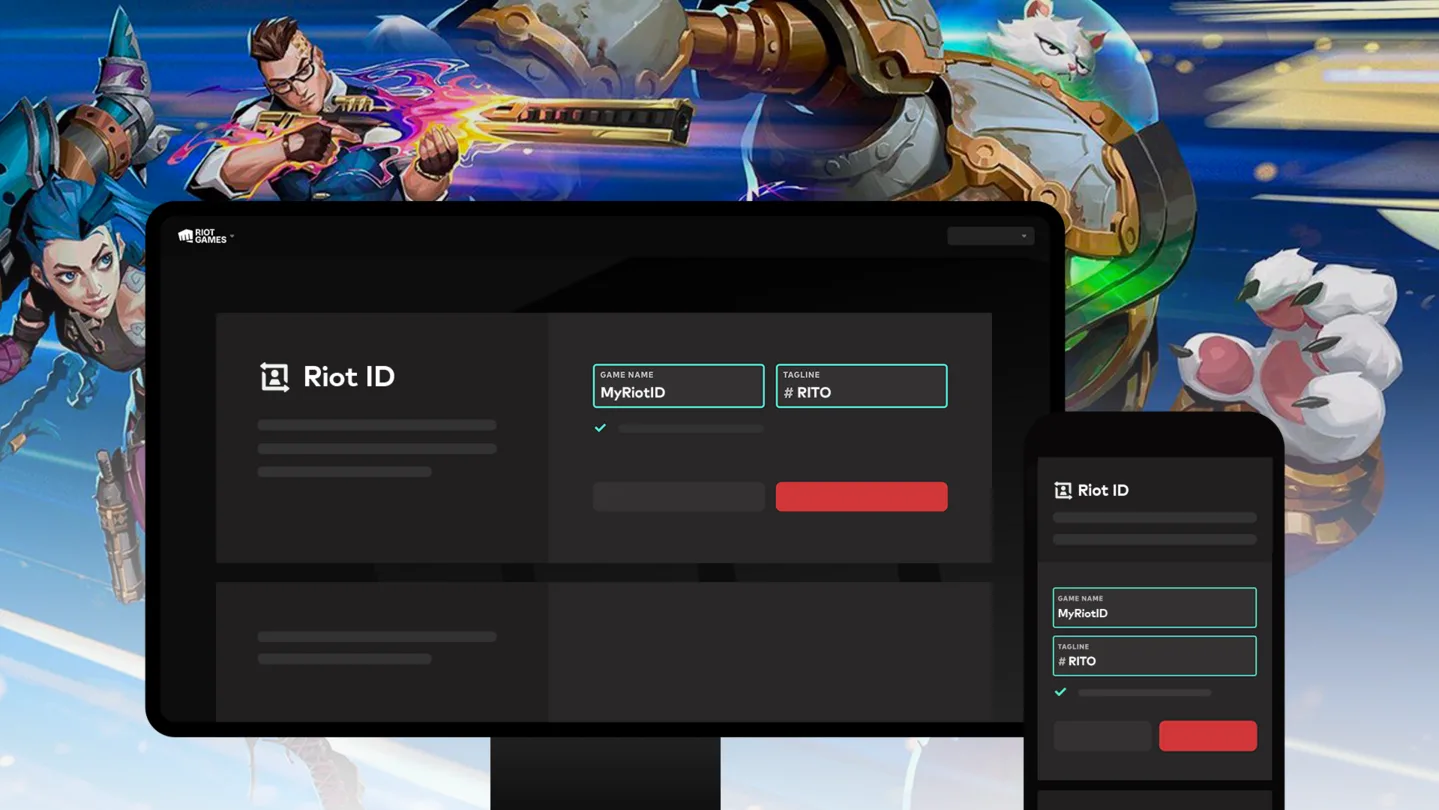
Once saved, your new Riot ID becomes your League of Legends display identity. Riot's official Riot ID change guide confirms that both your Game Name and tagline can be changed this way.
How to change your LoL name from the League client
You can also start a League of Legends name change from inside the PC client. Riot still opens the account website to complete the change, but the client gives you a direct route to it.
- Open League of Legends and sign in.
- Enter the Shop.
- Select the Account button.
- Choose the Riot ID Change option.
- Follow the popup to Riot's account website.
- Enter your new Riot ID and save the change.
This replaces the old system where League players purchased a Summoner Name change from the store.
If you prefer to follow the process visually, the walkthrough below shows how a League name change works step by step.
The interface can change over time, but the important part remains the same: your player-facing League name is controlled by your Riot ID, not by the old Summoner Name system.
What is a Riot ID in League of Legends?
A League of Legends Riot ID is the identity other players see across Riot's games. Riot IDs replaced Summoner Names as the main player-facing naming system in League of Legends and Teamfight Tactics.
Every Riot ID has two parts:
- Game Name: Your main display name.
- Tagline: A short identifier shown after a # symbol.
For example, if your Riot ID is BaronStealer#MID, your Game Name is BaronStealer and your tagline is MID.
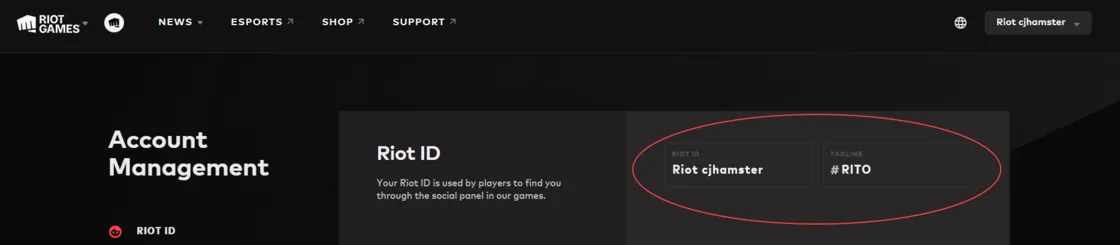
Your Game Name does not need to be unique by itself. What matters is the complete Game Name and tagline combination. That means multiple players can use the same Game Name as long as their complete Riot IDs differ.
Riot ID name and tagline rules
Before you change your Riot ID, make sure the new name follows Riot's current requirements. A name can be rejected even when the Game Name itself is not already taken.
| Riot ID rule | Requirement |
|---|---|
| Game Name length | 3 to 16 alphanumeric characters |
| Tagline length | 3 to 5 alphanumeric characters |
| Game Name uniqueness | The Game Name does not have to be unique |
| Full Riot ID | The complete Game Name + tagline combination must be available |
| Appropriate content | Game Names and taglines cannot contain offensive or inappropriate content |
| Use of "Riot" | Player names cannot contain "Riot" or lookalike variations intended to imitate it |
| Personal information | Riot advises against putting identifying information in your player name |
| Impersonation | Names used to impersonate esports professionals are not allowed |
Riot also restricts certain regional taglines. Current reserved tags include BR, LAS, LAN, OCE, NA, EUW, EUNE, TR, RU, KR, JP, PBE, BR1, LA1, LA2, OC1, NA1, ME, TW, VN and SEA.
Your account may begin with a regional tagline, but Riot says that once you change away from it, you cannot simply choose one of these reserved region codes again. If you receive a message saying a Riot ID is already in use when trying one of these tags, change the tagline and try again.
How often can you change Riot ID in League of Legends?
You can normally change your Riot ID for free once every 90 days. The cooldown is counted from your last free Riot ID change.
There is currently no regular paid option for changing it earlier. You cannot spend RP, Blue Essence or another Riot currency to bypass the cooldown.
This is worth highlighting because Riot's original announcement about moving from Summoner Names to Riot IDs described a different plan involving a 365-day cooldown and paid changes. Riot now explicitly marks that information as outdated. The final system instead uses free changes every 90 days.
Is it free to change your League of Legends name?
Yes. A standard League of Legends name change is now free because you are changing your Riot ID rather than buying a Summoner Name change.
You do not need:
- Riot Points (RP)
- Blue Essence (BE)
- A paid name change token
- Another form of Riot currency
The limitation is time rather than currency: after using your free change, you normally need to wait 90 days before changing your Riot ID again.
Can you change Riot ID before 90 days?
Normally, no. Riot does not offer a paid shortcut that lets you bypass the 90-day Riot ID cooldown.
There is one important exception. Riot says players who recently changed their Riot ID and are experiencing harassment or other negative effects because of that ID can contact Player Support for help. This is handled as a support case rather than a standard early name change.
Riot ID vs Summoner Name vs username
A lot of confusion around how to change your LoL name comes from Riot using several different naming terms over the years. A Riot ID, Summoner Name and login username are not the same thing.
| Name type | What it means | Can you change it? |
|---|---|---|
| Riot ID | Your current player-facing identity, made up of a Game Name and tagline | Yes, normally once every 90 days |
| Summoner Name | The former League-specific player name | Replaced by Riot IDs for player identity |
| Login username | The private username used to sign in to your Riot account | Generally no |
Riot ID
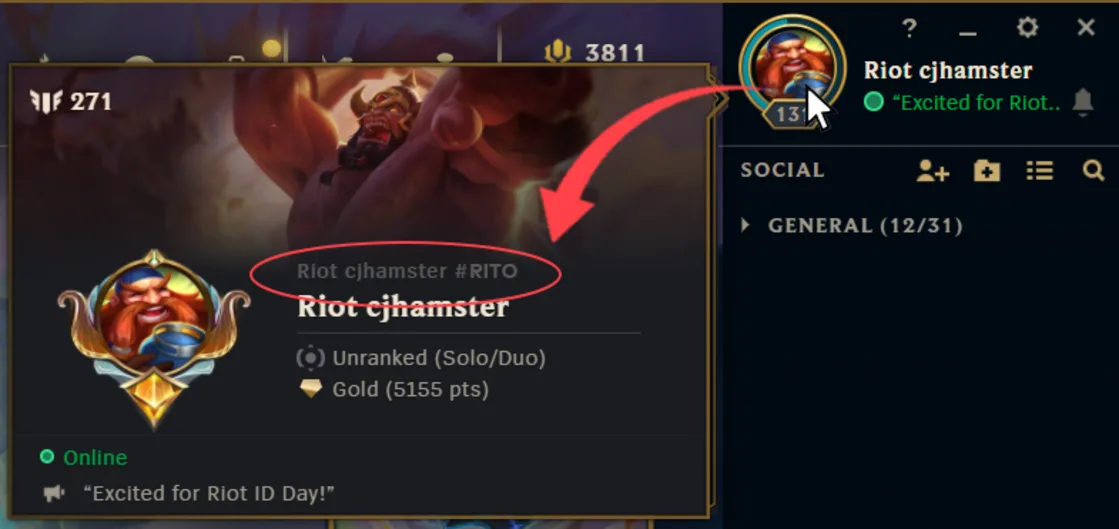
Your Riot ID is your League of Legends display identity. If your goal is to change the name that teammates, opponents and friends see, this is the name you need to change.
Summoner Name
Summoner Names were League's old player-facing naming system. Riot began transitioning League of Legends and Teamfight Tactics from Summoner Names to Riot IDs on November 20, 2023.
Riot's Summoner Name to Riot ID transition FAQ explains that Riot IDs took over the role previously handled by Summoner Names.
Riot login username
Your username is private and is used to sign in to your Riot account. Other League players do not normally see it, and changing your Riot ID does not change your username or password.
Can you change your League of Legends username?
If by "username" you mean the name displayed to other players, yes. You are actually looking for a Riot ID name change.
If you mean your private login username, the answer is different. Riot says login usernames generally cannot be changed on demand. They also need to be globally unique.
Some older Riot accounts may be prompted to update a duplicate login username. Riot provides its Riot Account Update page for these cases. This is separate from changing the Riot ID other players see in League.
Riot's global username FAQ also explains that once a required replacement login username has been set, it cannot simply be changed again later.
Can you still change your Summoner Name in LoL?
Not through the old Summoner Name system. If you search for how to change summoner name in LoL, you may still find guides telling you to purchase a rename using RP or Blue Essence. Those instructions are obsolete.
The modern equivalent of a League of Legends Summoner Name change is simply changing your Riot ID.
How to change your Riot ID tagline
You can change the tagline at the same time as your Game Name from the Riot ID section of your Riot Account. The tagline is the short part displayed after the # symbol.
For example:
- Before: RiftKing#1234
- After: RiftKing#MID
Your tagline must be 3 to 5 alphanumeric characters long. Changing only the tagline still counts as changing your Riot ID, so it will use your available name change and start the 90-day cooldown again.
Does your League of Legends name have to be unique?
No. Your Game Name does not have to be unique. Two players can use the same Game Name as long as their complete Riot IDs are different.
For example, these can identify different players:
- TeemoMain#TOP
- TeemoMain#EUW
- TeemoMain#123
However, remember that Riot reserves certain region-style taglines, so not every example above can necessarily be selected as a new custom ID. The important principle is that the full Riot ID, not the Game Name alone, distinguishes accounts.
What happens after you change your Riot ID?
A Riot ID change updates your player-facing identity, but it does not turn your account into a new account or erase your League progress.
- Your login username and password stay the same.
- Your League progression remains attached to your account.
- You stay on your existing friends' lists under your new display name.
- Your Riot ID changes across Riot games that use the same Riot account.
- Your next standard free Riot ID change becomes available after the 90-day cooldown.
If you want to dig further into your account history, RiftDaily also covers how to check your time spent on League of Legends and how much money you have spent on LoL.
Does changing your LoL name change it in VALORANT and other Riot games?
Yes. Riot describes the Riot ID as a universal identity used across its games. Changing it can therefore change how you appear in other Riot titles connected to the same Riot account, not just League of Legends.
If you play several Riot games, choose a name you are comfortable using across that ecosystem and double-check that you are signed into the correct account before saving the change.
Will changing your Riot ID remove you from friends lists?
No. Changing your Riot ID does not remove you from your existing friends' lists. Your account remains on those lists under the new display name.
If you make a dramatic name change, it may still be worth telling friends what your new Riot ID is so they recognize you.
Can you lose your Riot ID if you stop playing?
Riot says Riot IDs themselves are not lost simply because you have been inactive. The tagline system provides enough possible combinations that Riot does not need to free inactive Riot IDs in the same way older unique naming systems sometimes did.
This is separate from Riot's rules for extremely inactive accounts, which can potentially be subject to account deletion under Riot's broader inactivity policies.
Why can't I change my League of Legends name?
If your League of Legends name change is not working, check these common causes before assuming there is a client bug.
- Your 90-day cooldown is still active: Wait until another free Riot ID change becomes available.
- The complete Riot ID is unavailable: Try another tagline if you want to keep the same Game Name.
- Your Game Name is invalid: Make sure it meets Riot's length and naming requirements.
- Your tagline is invalid: It must meet the current length and character requirements.
- You selected a reserved region tag: Tags such as NA, EUW, EUNE and KR cannot normally be selected as custom taglines.
- The name violates Riot's rules: Offensive content, impersonation and certain other names can be rejected or later changed by Riot.
- You are on the wrong Riot account: This is especially easy to do if you maintain multiple League accounts.
- Riot services are having problems: Account or client issues can occasionally prevent changes from going through normally.
If Riot services appear unavailable, check the League of Legends server status. For broader client problems, our League of Legends troubleshooting guides cover common fixes.
If League itself will not launch, the issue may be unrelated to your Riot ID. See our League of Legends Vanguard error codes guide for anti-cheat problems. You can also follow our guides on how to uninstall League of Legends and downloading League of Legends if a clean reinstall becomes necessary.
Why did Riot replace Summoner Names?
Riot moved away from Summoner Names to create a more consistent player identity across its games and simplify how naming works technically.
The change also means every League player no longer needs an entirely unique Game Name. Instead, the tagline distinguishes players who choose the same name.
Riot began rolling out the change for League of Legends and Teamfight Tactics on November 20, 2023. The transition also brought League into the Riot ID system already used elsewhere in Riot's ecosystem.
For future changes to Riot accounts, the League client and other major systems, follow RiftDaily's League of Legends news and League of Legends updates. Our main League of Legends guides section also covers practical account, client and gameplay questions.
Frequently asked questions about how to change name in LoL
How do you change your name in League of Legends?
Sign in at account.riotgames.com, open the Riot ID section, enter a new Game Name and tagline, then select Save Changes. You can also start the process through the League client by going to Shop > Account > Riot ID Change.
Is a League of Legends name change free?
Yes. Riot ID changes are free when your change is available. You no longer need to spend RP or Blue Essence to change the display name other players see in League.
How often can you change your Riot ID?
You can normally change your Riot ID once every 90 days. The cooldown runs from your last free Riot ID change.
Can you pay to change your Riot ID early?
No. Riot currently has no standard paid option for bypassing the 90-day cooldown.
Can you change your Riot ID tagline?
Yes. You can change your Game Name, tagline or both. Changing only the tagline still counts as a Riot ID change and starts the normal cooldown.
Can two League players have the same name?
Yes. Game Names do not have to be unique. Two players can use the same Game Name as long as their complete Riot IDs, including the taglines, are different.
Does changing your Riot ID affect your login?
No. Your Riot ID is separate from the private username and password you use to sign in. Changing your League display name does not change your login credentials.
What happened to Summoner Names in League of Legends?
Riot transitioned League of Legends and Teamfight Tactics from player-facing Summoner Names to Riot IDs beginning November 20, 2023. A Riot ID now fills the role that most players previously associated with their Summoner Name.
Change your Riot ID, not your League login username
The key thing to remember when learning how to change name in League of Legends is that your Riot ID is your display name. Sign in to your Riot Account, choose a new Game Name and tagline, and save the change. It is free once your 90-day cooldown has expired.
Your private login username stays separate, and the old paid Summoner Name system no longer applies. If you run into problems with the client or account services, check our League troubleshooting guides, or browse more League of Legends guides on RiftDaily.