How much time have I spent on League of Legends is easiest to estimate by checking your account on a LoL playtime tracker, then comparing that number with your client stats, match history, and total games played.
The fastest method is Wasted on LoL, also known as wol.gg. It can give you a quick estimate of your League of Legends hours played, usually shown in minutes, hours, or days. The more accurate method is to use that result as a starting point, then verify it with other stat sites and a manual calculation.
No public tool is perfect. Some trackers count only available match data, not queue time, champion select, dodges, practice tool, replays, or time spent browsing the client. Still, with the right method, you can get a realistic answer to how much time have I spent on League of Legends without guessing.
How to check how much time have I spent on League of Legends
Start with the table below. It puts the main LoL playtime methods in one place, including the best tracker sites, what each option is good for, and where the number can be incomplete.
| Method | Best for | Where to check | What it usually counts | Main limitation |
|---|---|---|---|---|
| Wasted on LoL playtime tracker | Fast lifetime estimate | Wasted on LoL | Available match-based playtime shown as minutes, hours, or days | May miss older matches, renamed accounts, transfers, unsupported regions, or unavailable data |
| League client stats | Current season and ranked context | League of Legends client | Ranked games, seasonal stats, champion performance, and recent activity shown in-client | Does not give one simple lifetime League of Legends playtime total |
| Match history and stat sites | Checking games, modes, champions, and recent match patterns | OP.GG, LeagueOfGraphs, U.GG, Mobalytics, League of Legends Tracker | Recent matches, ranked records, champion stats, win rates, builds, and profile data depending on the site | Better for match history and performance than exact lifetime hours played |
| Your own LoL time spent calculator | Custom estimate with your own assumptions | Your match count from the client or stat sites, then a simple manual formula | Games played multiplied by average match length, with optional queue and champion select time added | Only as accurate as your game count and average match-length assumptions |
For the quickest answer, use Wasted on LoL first. For the most useful answer, compare that estimate with your recent games, ranked history, account age, and the number of modes you usually play. If the result looks too low, build your own estimate from match counts and average game length.
- Open a LoL hours played tracker such as Wasted on LoL.
- Enter your Riot ID, summoner-style name, or the name format requested by the tool.
- Select the correct region, such as NA, EUW, EUNE, KR, BR, OCE, JP, or another supported server.
- Run the search and write down the result in minutes, hours, or days.
- Compare the estimate with your ranked games, normal games, ARAM history, and older accounts.
Never enter your Riot password into a third-party playtime site. A public stats tool should only need a player name, Riot ID, tagline, or region. If a site asks for login details, close it.
For broader League help, bookmark our League of Legends guides. If you are returning after a long break and need the client again, our LoL download guide can help you get set up before checking your account.
Can you see your total League of Legends playtime in the client?
The League client can show useful stats, but it is not built around one clean lifetime counter for every minute you have ever played. That is why players usually use a League of Legends playtime tracker, match history sites, ranked records, and manual calculations when they want to know how much time have I spent on League of Legends.
The official League site is still the best place to start for the game itself, while Riot’s League of Legends support is the right place for account, login, billing, name, or technical problems. For total playtime, though, most players need an estimate rather than a direct official lifetime number.
This is where wording matters. LoL playtime can mean time inside completed matches, ranked-only time, time across all modes, or your full session time including queue, champion select, loading screens, post-game lobbies, and time spent changing settings. Most public tools focus on match time, not every minute connected to League.
Use Wasted on LoL for a quick estimate
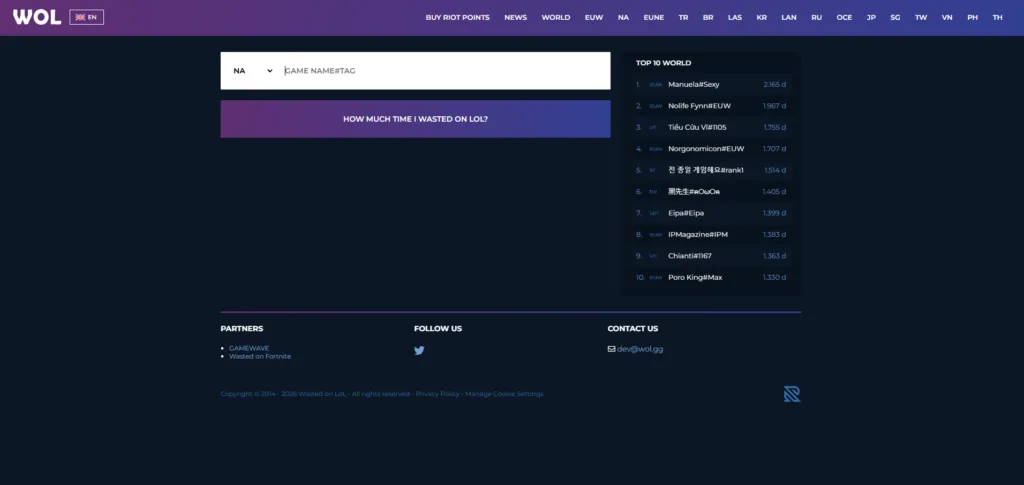
Wasted on LoL is the tool many players mean when they search for time wasted on LoL, how much time have I wasted on League of Legends, or how much time have I wasted on LoL. The name sounds harsh, but the number is better treated as a playtime estimate, not a judgment on whether you enjoyed the game.
Make sure the region is correct before you trust the result. A player name on EUW is not the same as a player name on NA, and the wrong server can return an empty, outdated, or unrelated profile. If you changed names, transferred regions, or used more than one account, check each one separately.
This walkthrough shows the basic idea of using an hours tracker, then you can apply the same checks to your own account and region.
After you get a number, convert it into a format you can actually understand. For example, 120,000 minutes equals 2,000 hours, which is about 83 full days of match time. That sounds different from a big minute total, and it gives you a better feel for your real League of Legends playtime.
Use match history sites to check whether the number makes sense
Match history and stat sites are not always built to answer how many hours have I played League of Legends directly. Their real value is helping you check whether a LoL playtime result feels believable.
For example, if Wasted on LoL shows a very small number but OP.GG or another stat site shows years of ranked activity, the tracker may be missing part of your account history. If your recent match history is mostly ARAM, your average game length will probably be different from a player who only grinds ranked Summoner’s Rift.
Use stat sites to look for clues such as total ranked games, recent game volume, champion activity, queue types, and how long your matches usually last. That will not give you a perfect lifetime total, but it will make your LoL time spent calculator much more realistic.

It also helps to check whether League itself is having problems before blaming your account or a tracker. Our LoL server status page can help you rule out downtime, while our League troubleshooting guides cover common client and login problems.
What LoL playtime trackers include and miss
A League of Legends time spent calculator usually focuses on time inside completed matches. That means it can be useful while still leaving out a lot of your real League routine.
- Usually included: completed games available to the tool, estimated match duration, region-based account data, and public match-based activity.
- Often missing: queue time, champion select, dodged lobbies, loading screens, practice tool, client browsing, shop browsing, replays, and time spent changing settings.
- May be incomplete: very old matches, transferred accounts, renamed accounts, accounts on unsupported regions, private data, or matches the tool cannot access.
That does not make these tools useless. It just means the answer to how many hours have I played League of Legends should be read as a strong estimate, not a perfect record of every minute.
If you are comparing your hours to the wider community, our League of Legends player count coverage gives more context for how large the game still is. For a broad background on the game’s history and genre, the League of Legends overview is also useful.
How to calculate your League of Legends hours played manually
A manual LoL time spent calculator is the best backup when a tracker cannot find your Riot ID, shows the wrong region, or gives a result that clearly does not match your account. It also lets you decide whether to count only match time or full session time.
The simple formula is:
Total games played × average minutes per game ÷ 60 = estimated League of Legends hours played
For example, 3,000 games at 30 minutes each equals 90,000 minutes, or 1,500 hours. If you add five minutes per game for queue, champion select, loading, and post-game downtime, that same 3,000-game account gains another 250 estimated hours.
Step 1: Separate your game modes
Do not treat every League match the same. Ranked Summoner’s Rift, normal draft, ARAM, rotating game modes, Co-op vs. AI, and custom games can have very different lengths. Split your estimate into groups when possible.
- Ranked games × 30 to 35 minutes
- Normal games × 28 to 35 minutes
- ARAM games × 18 to 25 minutes
- Bot games × 15 to 25 minutes
Adjust those ranges based on your own habits. A player who mostly surrenders early, plays quick ARAMs, or queues with aggressive friends will not have the same average as a ranked player who regularly reaches 40-minute games.
Step 2: Add queue and champion select for real session time
Match time answers how much time have I spent on LoL inside games. Session time is bigger. If you want a more honest number, add five to ten minutes per match for queue, champion select, dodges, loading, post-game screens, and short breaks between games.
That extra time adds up fast. Across 2,000 games, even five extra minutes per game equals 10,000 more minutes, or about 167 additional hours.
Step 3: Convert the result into days, weeks, and habits
Hours alone can feel abstract, so convert the number into something useful. Divide hours by 24 for full days. Divide total hours by the number of years you have played to estimate your yearly pace. Then divide again by 52 if you want a rough weekly average.
This is where a League of Legends time spent calculator becomes more than a curiosity. It can show whether your playtime is casual, seasonal, competitive, or heavier than you realized.
Once you know your number, you can make better choices for future games. Our best LoL settings guide can help make your matches smoother, and our LoL model viewer is useful when you want to inspect champions and skins outside a live match.
The same process is shown in another format here, which can help if you prefer seeing the steps before trying them yourself.
Use the video as a quick visual check, but still treat any number as an estimate. The more you have played across old seasons, renamed accounts, and multiple servers, the more likely it is that one tool will miss something.
Why your Wasted on LoL number may look wrong
A strange Wasted on LoL result does not always mean you typed something wrong. LoL playtime tools depend on available match data, region support, account identification, and the way each site calculates match duration.
You selected the wrong region
This is the most common issue. If you played on EUW for years but search NA, the tool may show no result or a completely different player. Always match the server to the account you actually used.
Your Riot ID or name format is different
Some tools ask for a Riot ID and tagline, while others still use older summoner-style search fields. Try the exact format the site requests, including capitalization, spacing, special characters, and the correct region or tag.
You changed names or transferred servers
Name changes and server transfers can make old activity harder to connect to your current profile. If your League history is split across regions or accounts, you may need to check each one and add the results together.
Older games may not be fully counted
If you started playing many seasons ago, some old activity may not appear in modern tools. This is one reason veteran accounts sometimes show lower League of Legends playtime than expected.
The tool is counting match time, not everything around it
Queue time, champion select, dodges, lobby chat, rune edits, client browsing, esports watching, and patch reading can all be part of your League routine, but they are usually not part of the tracker number.
If your playtime result makes you want to revisit the fun side of the game, browse our LoL skins coverage, check the latest League news, or follow our LoL updates for patch and content changes.
What to do with your League of Legends playtime number
Once you know how many hours do I have on LoL, the better question is what the number tells you. For some players, it is a badge of honor. For others, it is a reminder to set better limits. Both reactions are normal.
Do not let the phrase time wasted on LoL decide the meaning for you. Time spent learning champions, building friendships, climbing ranked, following esports, or relaxing after work is not automatically wasted. The number becomes a problem only if it is crowding out sleep, health, school, work, relationships, or other goals that matter more to you.
Here are better ways to use the result:
- Set session limits: Decide on two or three games before you queue, not after a loss streak starts.
- Track ranked quality: Notice whether your best games happen early in the session or after several hours.
- Protect sleep: Late-night games feel short until the post-game screen says it is 2 a.m.
- Practice with intent: Pick one champion pool, role, matchup, or weakness instead of grinding on autopilot.
- Compare fun to frustration: If the hours are high but enjoyment is low, change mode, role, friends, schedule, or goals.
A LoL hours played tracker gives you the number. You decide whether that number means mastery, memories, burnout, or a reason to reset your habits.
Frequently asked questions about time spent on League of Legends
What is the easiest way to check League of Legends playtime?
The easiest way is to use Wasted on LoL, select your region, and search your account. It gives a fast estimate of your LoL playtime without requiring manual math.
Is Wasted on LoL accurate?
Wasted on LoL is useful, but it should be treated as an estimate. It may not include every old match, every region, every transferred account, or every minute spent outside active games.
Can Riot support tell me my total hours played?
Riot support is best for account and technical help, but public playtime checking is usually done through trackers, client stats, or manual estimates. For account-specific problems, use the official support site instead of sharing login details with random tools.
How do I calculate how many hours have I played League of Legends manually?
Multiply your total games by an estimated average match length, then divide by 60. For example, 1,200 games at 30 minutes each equals 36,000 minutes, or 600 hours.
Does LoL playtime include queue and champion select?
Most trackers focus on match time, so queue and champion select are usually not included. Add extra minutes per game if you want a broader estimate of total session time.
Why does my League of Legends hours played result seem too low?
The result may be low because of region selection, Riot ID format, older match data, server transfers, name changes, unsupported regions, or missing game modes. Try another tracker and compare it with your own game count estimate.
What is the best LoL hours played tracker?
Wasted on LoL is the most direct option for a quick playtime estimate. OP.GG, U.GG, LeagueOfGraphs, Mobalytics, and League of Legends Tracker are better for match history, ranked context, champion stats, and recent activity checks.
Is time wasted on LoL actually wasted?
Not always. If you enjoyed the game, learned skills, played with friends, or followed a hobby you care about, the time had value. It becomes a concern only when it harms areas of life that matter more to you.
Turn your LoL playtime into better games
Checking how much time have I spent on League of Legends is useful because it turns a vague feeling into a number. Start with Wasted on LoL, compare it with client stats and match history sites, then use a manual formula if the result looks incomplete.
After that, use the number wisely. Improve your setup with our best LoL settings guide, fix issues through League troubleshooting, check LoL server status before queueing, and keep learning with our League guides.
You can also explore the game beyond raw hours: reinstall with our LoL download guide, compare activity through League player count, preview champions in the LoL model viewer, browse LoL skins, follow League news, and stay current with LoL updates. Your hours are the past, but your next queue can still be smarter than the last one.