League of Legends server status tells you whether Riot’s live services are operating normally, undergoing maintenance, or experiencing an outage in your region. To check if LoL is down, open Riot’s official service status page, select League of Legends, choose your region, and review any active incident or maintenance messages.
If Riot shows no active problem, compare the symptoms with Riot Support updates and player reports. When other players in your region are connecting normally, the issue is more likely to involve your Riot Client, Vanguard installation, computer, router, internet provider, or route to Riot’s servers.
Always check the servers before reinstalling the game or changing network settings. That simple step can save a lot of time when login, matchmaking, champion select, or the game-launch process suddenly stops working.
Is League of Legends down right now?
The fastest way to find out whether League of Legends is down is to check the official Riot Games service status page. Select League of Legends and make sure the page is showing the same region as your account.
Riot’s status page is more reliable than a static green or red status indicator because League conditions can change at any time. It displays active incidents, scheduled maintenance, affected regions, affected platforms, and recently resolved problems.
| What you need to check | Best source | What it tells you |
|---|---|---|
| Current League server status | Riot Games service status | Active incidents, maintenance, and recently resolved issues. |
| Region-specific outage | Region selector on Riot’s status page | Whether EUW, EUNE, NA, Korea, Brazil, Turkey, or another server is affected. |
| Fast Riot updates | Riot Support on X | Short updates during major outages, patch delays, or developing incidents. |
| Sudden player-report spike | Downdetector | Whether many players have started reporting problems at the same time. |
| Specific errors and symptoms | League community reports | Which regions, queues, and client features appear to be affected. |
| PBE availability | Official League PBE page | Information about the separate and less stable test environment. |
Latest confirmed maintenance: July 28 to July 29, 2026
Riot confirmed a scheduled ranked maintenance period during the transition from Ranked Season 2 to Season 3. This is planned downtime rather than an unexpected League of Legends server outage.
| Event | Date and time | What happens |
|---|---|---|
| Ranked Season 2 ends | July 28 at 23:59 local server time | Season 2 closes on the final day of Patch 26.14. |
| Ranked Solo/Duo disabled | During the season transition | Players cannot enter the Solo/Duo ranked queue until Season 3 begins. |
| Ranked Flex disabled | During the season transition | The Ranked Flex queue is also unavailable during the downtime. |
| Shard transfers disabled | During reward processing | Transfers close temporarily so Riot can calculate and distribute ranked rewards correctly. |
| Ranked Season 3 begins | July 29 at 12:00 noon local server time | Ranked queues return as League moves into Patch 26.15 and Season 3. |
Riot says it does not expect the transition to disrupt existing LP or ranked progression. However, the Victorious Ranked mission that requires 15 ranked wins will refresh when Season 3 begins.
The times are based on each region’s local server time. This means the transition does not happen simultaneously according to one worldwide clock. Players should check their own regional status page and client messages as the maintenance window approaches.
Normal games and other modes are not specifically listed as part of the ranked shutdown. However, patch deployment or additional maintenance can still affect login, matchmaking, or the client, so Riot’s live status page remains the authoritative source during the transition.
You can read Riot’s complete announcement in the official League of Legends Patch 26.14 notes.
Current and past League of Legends server statuses
The table below covers recent scheduled maintenance and significant League outages. It also identifies whether an event was officially confirmed or primarily detected through player reports.
That distinction matters. Downdetector and social media can reveal a developing outage before Riot publishes a notice, but crowdsourced reports cannot always prove whether the cause is Riot, a regional ISP, a cloud provider, or a local client update.
| Date | Incident type | What happened | Confirmation |
|---|---|---|---|
| Live status | Check Riot | Use Riot’s service status page for the latest condition in your League region. | Official live source |
| July 28 to July 29, 2026 | Scheduled ranked maintenance | Ranked Solo/Duo, Ranked Flex, and shard transfers close between the end of Season 2 and the beginning of Season 3. | Official Riot patch notes |
| June 23, 2026 | Resolved player-reported outage | Thousands of reports appeared, with game-launch and partially loaded client problems among the most common symptoms. | Downdetector and media reports; Riot’s status page did not initially list an incident |
| March 10, 2026 | Resolved player-reported outage | More than 7,000 reports were recorded during a sharp spike in server-connection problems. | Third-party monitoring reports |
| January 4 to January 5, 2026 | Resolved widespread login outage | Players across multiple regions could not open or log in through the League client. Technical investigation linked the problem to an expired client certificate. | Riot acknowledged the outage; the technical cause was documented through client logs and subsequent reporting |
| December 5, 2025 | Resolved third-party infrastructure outage | A Cloudflare network failure affected a large share of its traffic for approximately 25 minutes. League and other gaming services received increased outage reports. | Cloudflare post-mortem and third-party service reports |
| November 18, 2025 | Resolved third-party infrastructure outage | A major Cloudflare failure caused widespread internet errors. Riot reported player disconnections while Cloudflare restored its network. | Cloudflare post-mortem and Riot status updates |
| October 6, 2025 | Resolved connection disruption | Players reported extreme lag, high ping, and disconnections. Ranked queues were temporarily disabled while Riot applied protective measures. | Riot acknowledgement and widespread outage reports |
| July 22, 2025 | Resolved player-reported disruption | A shorter increase in reports pointed to matchmaking and connectivity issues for some EUW and NA players. | Third-party monitoring and community reports |
Short disruptions may never receive a permanent Riot incident page. They can begin and end before Riot finishes investigating, or they may affect only one provider, one location, or one part of the client.
The fastest ways to check League of Legends server status
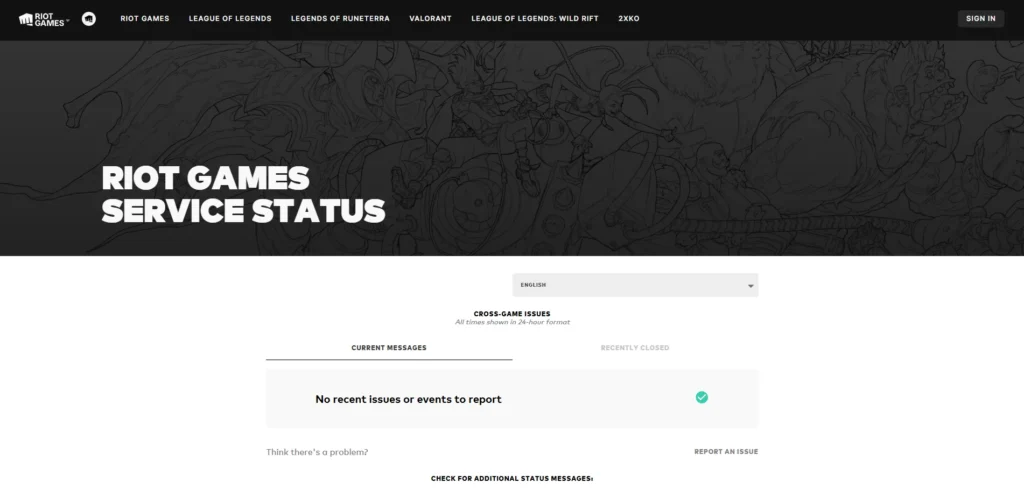
If you are asking, “is LoL down?” begin with the Riot Games service status page. Select League of Legends, choose your region, and look for alerts connected to login, matchmaking, game sessions, store access, social systems, or maintenance.
Next, check Riot Support on X and the main League of Legends account. Riot may publish a brief update while an incident is still being investigated.
After that, compare reports on Downdetector, r/leagueoflegends, and r/LoLTechSupport. A sudden wave of players describing the same symptom in the same region is strong evidence of a wider problem.
Use official sources first and community sources second. The community can confirm that a problem is widespread, but Riot is the best source for identifying scheduled maintenance, affected systems, and when an incident has been resolved.
What the official Riot status page actually tells you
Riot’s status hub provides more information than a simple online or offline indicator. It separates service problems by Riot game, server region, platform, and incident type.
An active notice may say Riot is investigating a problem, has identified the cause, is applying a fix, or is monitoring the service after restoration. Recently closed messages can also confirm that an issue you experienced earlier was on Riot’s side.
| Status information | What it means |
|---|---|
| Current messages | Active outages, degraded services, maintenance, or ongoing investigations. |
| Recently closed | Incidents Riot has resolved or scheduled maintenance that has ended. |
| Affected regions | The League server or shard experiencing the problem. |
| Affected platforms | Whether Windows, macOS, or both are affected. |
| Maintenance message | Planned work that may disable login, queues, transfers, or other features. |
| Investigation message | Riot knows a problem exists but may not yet know its cause or duration. |
| Resolved message | Riot believes the affected service has returned to normal. |
Make sure the selected region matches your account. An EUW outage does not automatically mean EUNE, NA, Korea, or another regional platform is also unavailable.
Best League of Legends status trackers compared
| Where to check | Best for | Reliability | Limitation |
|---|---|---|---|
| Riot Games service status | Confirmed outages and scheduled maintenance | Highest | A very new or brief incident may not appear immediately. |
| Riot Support on X | Fast updates during larger incidents | High | Not every small or regional problem receives a post. |
| League of Legends on X | Major announcements and patch notices | High | The account is not dedicated entirely to technical support. |
| Downdetector | Detecting a sudden rise in player reports | Medium | Crowdsourced reports do not prove the cause. |
| r/leagueoflegends | Comparing symptoms across regions | Medium | Posts can be inaccurate, duplicated, or based on local issues. |
| r/LoLTechSupport | Finding other players with the same error | Community source | Troubleshooting advice is unofficial. |
| Your client and network tests | Diagnosing a local issue | Essential after server checks | A normal speed test does not prove the route to Riot is stable. |
What player outage reports can and cannot prove
Player reports often appear before an official Riot notice. This makes them useful during the first minutes of an outage, especially when thousands of people suddenly report failed logins, missing client content, or games that will not launch.
However, a spike in reports does not identify the root cause by itself. The original failure could involve Riot, Cloudflare, a large internet carrier, a regional ISP, a DNS provider, or a newly released client update.
Look for three signals before treating community reports as evidence of a wider outage:
- Many reports appearing within the same short period.
- Players naming the same server region or internet provider.
- Players describing the same symptom, such as login failure, disabled matchmaking, or a game that will not launch after champion select.
A single Reddit post claiming “EUW is down” is not strong evidence. Hundreds of EUW players suddenly reporting the same login error is much more meaningful.
Is League of Legends down, or is it just your setup?
If Riot shows no incident in your region and player reports remain normal, the problem is more likely to be local. Common causes include a stuck Riot Client session, damaged files, Vanguard, a pending system restart, firewall interference, antivirus software, overlays, Wi-Fi instability, or a poor ISP route.
| What you are seeing | Most likely category | What to check next |
|---|---|---|
| Many players in your region fail at the same time | Riot-side or regional outage | Riot status and community reports |
| Only your computer is affected | Client, Vanguard, firewall, or local system issue | Restart the client and computer |
| Every device on your home network has trouble reaching Riot | Router, DNS, ISP, or routing problem | Restart the router and test another connection |
| League works through a mobile hotspot | Home connection or ISP route | Check the router, DNS, and ISP |
| Champion select works, but the match never opens | Game launch, Vanguard, security software, permissions, or damaged files | Check the exact launch or VAN error |
| You receive a VAN error | Riot Vanguard or Windows security requirement | Use the fix for the specific VAN code |
| Friends list or chat is unavailable, but matches work | Social-service degradation | Check Riot for a social-system notice |
| Normal modes work, but ranked is disabled | Queue-specific maintenance or restriction | Check ranked and maintenance notices |
| The problem began directly after a patch | Patching, client files, antivirus conflict, or a new bug | Restart and use Riot’s repair guidance |
A Vanguard issue can look like a server outage because it may prevent League from launching or remove you from a session. Our League of Legends Vanguard error codes guide explains what the individual VAN codes mean and how to fix them.
If League opens normally but performs poorly once you enter a match, the servers may not be the problem. Use our best League of Legends settings guide to improve frame rate, visibility, controls, and overall game performance.
This video gives a simple walkthrough of Riot’s status tools before you begin deeper troubleshooting.
Common League of Legends outage symptoms
A League outage does not always display a clear server-down message. Authentication, matchmaking, game sessions, chat, purchases, patch delivery, and Vanguard are separate systems that can fail in different ways.
| Symptom | What it may mean |
|---|---|
| Unable to log in | Authentication failure, maintenance, expired client session, or connection problem. |
| Unexpected login queue | Riot may be limiting access while services recover or demand is unusually high. |
| Play button unavailable | Maintenance, queue restriction, incomplete patch, or client service problem. |
| Matchmaking unavailable | One or more queues may have been disabled without taking the entire client offline. |
| Accept button never appears | Matchmaking or client communication may be degraded. |
| Champion select disconnects | Client instability, regional service degradation, or a connection failure. |
| Game fails to launch after champion select | Game-session problem, Vanguard, antivirus interference, permissions, or damaged files. |
| Attempting to reconnect | The game client has lost its connection to the live match. |
| Friends list is missing | Riot’s social services may be degraded while matches remain available. |
| Store does not load | The commerce service may be unavailable even when gameplay works. |
| Patch download appears stuck | The client may be verifying files, unable to reach patch servers, or blocked locally. |
| High ping or packet loss | Regional routing, ISP, Wi-Fi, or Riot network instability. |
| VAN error code | Vanguard or Windows security issue rather than a normal server outage. |
Why LoL maintenance and outages happen
League of Legends maintenance normally happens around patch deployment, backend work, ranked season transitions, database changes, or regional infrastructure updates. Riot can disable one service without taking the entire game offline.
For example, Ranked Solo/Duo, Ranked Flex, or shard transfers may be disabled while Normal games and ARAM remain available. During a larger update, Riot may also stop new logins or close matchmaking shortly before maintenance begins.
Unexpected outages can have several causes:
- Authentication or Riot account-service failures.
- Matchmaking and live game-session problems.
- Bugs introduced by a client or game patch.
- Regional routing, peering, or ISP failures.
- Third-party cloud and internet infrastructure outages.
- Certificate, DNS, or security-service failures.
- Traffic spikes, capacity problems, or protective measures during an attack.
The Cloudflare incidents in November and December 2025 showed how League can become difficult to access even when Riot is not the original source of the failure. Problems at a major infrastructure provider can affect many unrelated services at the same time.
League’s large player base also means a short disruption can produce thousands of reports within minutes. Our League of Legends player count guide provides more context on the game’s scale and activity.
Common outage patterns players keep seeing
League outages are often shorter and more limited than they first appear. A login failure can prevent thousands of players from entering the game even while active matches continue normally. A matchmaking problem can block new games without disconnecting matches that are already running.
Most incidents fall into five common patterns:
- Login outage: The Riot Client opens, but accounts cannot authenticate.
- Queue outage: Login works, but one or more matchmaking queues are disabled.
- Game-launch failure: Players finish champion select, but the match does not open.
- Connection degradation: Matches run with high ping, freezes, packet loss, or disconnects.
- Partial-service outage: Chat, friends lists, profiles, loot, transfers, or the store fail while gameplay remains available.
This explains why two players can describe the same incident differently. One may be unable to log in, another may still be playing, and a third may only notice that chat or the friends list has disappeared.
What to do when League is not working but Riot shows no outage
If Riot lists no incident and other players in your region appear unaffected, work through the following steps in order. Test League after each step so you know what actually solved the problem.
1. Fully close League and the Riot Client
Closing the visible client window may leave Riot processes running in the background. On Windows, open Task Manager and close League of Legends, Riot Client, and related Riot processes before reopening the client.
Sign out and back in when the client opens but appears unable to load matchmaking, social features, account balances, or other content.
2. Restart your computer
A full restart clears stale sessions, restarts Riot Vanguard, completes pending updates, and releases files or processes that may be blocking League.
Restart before reinstalling. Many League and Vanguard problems continue until Windows has completed a proper reboot.
3. Record the exact error message
Do not treat every League error as a server outage. A VAN code, patching error, authentication message, DirectX error, or failed-to-launch notification can point to a specific local cause.
Write down or capture the complete error code before closing the message. The exact wording is much more useful than simply reporting that the client does not work.
4. Disable VPNs, proxies, and custom network tools
Temporarily disable gaming VPNs, privacy VPNs, proxies, traffic filters, and custom tunnelling tools. These applications change the route between your computer and Riot and may interfere with authentication or live game traffic.
A VPN can occasionally route around an ISP problem, but it can also add latency or create a new connection issue. Test your normal connection first.
5. Test Ethernet instead of Wi-Fi
A Wi-Fi connection can perform well in a speed test while still suffering from packet loss, interference, or brief interruptions. League needs a consistent connection more than it needs a very high download speed.
Connect directly to the router with an Ethernet cable where possible. If the problem disappears, the Wi-Fi signal or local interference is the likely cause.
6. Restart your router
Turn the router off, leave it disconnected briefly, and start it again. This can clear temporary connection states, local DNS issues, or routing problems.
A router restart cannot fix a Riot outage, which is why checking the official server status comes first.
7. Check firewall and antivirus permissions
A League, Riot Client, or Vanguard update can change executable files and cause security software to block them again. Check that the relevant Riot applications are allowed through your firewall and antivirus program.
Only disable security software temporarily as a controlled test. Turn it back on immediately and never leave your firewall or antivirus disabled as a permanent League fix.
8. Update Windows, macOS, and network drivers
Install stable operating-system updates and check for an updated network-adapter driver. Outdated drivers or incomplete updates can cause login failures, Vanguard problems, disconnections, and unstable game traffic.
Restart the computer after installing updates, even when the installer does not explicitly request it.
9. Check patching and damaged game files
A failed or interrupted update can leave the Riot Client with missing or corrupted files. Use the client’s repair options and Riot’s official troubleshooting guidance before performing a complete reinstall.
Do not assume the patcher has frozen because the download speed reaches zero near the end. The client may be unpacking, writing, or verifying files in the background.
10. Clear temporary DNS problems
If normal websites work but the Riot Client cannot consistently reach League services, a stale DNS entry may be involved. Windows users can open Command Prompt and run:
ipconfig /flushdnsRestart the Riot Client after flushing DNS. Avoid opening ports, resetting the full Windows network stack, or changing several network settings at once unless simpler tests fail or Riot Support recommends it.
11. Test another internet connection
A temporary mobile hotspot is useful as a diagnostic test. If League works through the hotspot but repeatedly fails through your home connection, the issue is likely related to your router, DNS setup, ISP, or route to Riot.
Avoid downloading a large League patch through a limited mobile plan unless you understand the data usage. The hotspot test only needs to confirm whether the client can connect.
12. Collect logs and contact Riot Support
If the problem continues, use the Riot Repair Tool to collect relevant logs before submitting a support ticket. Include your region, the exact error, when the problem began, whether another network works, and which troubleshooting steps you have already completed.
The official League of Legends Support site contains current guidance for connection failures, patching problems, Vanguard errors, crashes, game-launch failures, and log collection.
When should you reinstall League of Legends?
Reinstall League only after the status, restart, network, security-software, and repair checks have failed. A reinstall can replace corrupted files, but it cannot fix an outage on Riot’s side, an ISP routing failure, an account restriction, or an unsupported Windows security configuration.
Before uninstalling, confirm that Vanguard is not the real cause. League may reinstall correctly and still fail when Vanguard or a required Windows security setting remains broken.
Use our complete League of Legends uninstall guide for a clean removal. You can then follow our League of Legends download guide to obtain the official Windows or Mac installer.
League of Legends server status by region
League operates through several regional platforms. An incident may affect one server while players elsewhere continue logging in and playing normally.
| Region | Common abbreviation | What to remember |
|---|---|---|
| Europe West | EUW | Check EUW specifically. An EUNE incident may not apply. |
| Europe Nordic & East | EUNE | EUNE is a separate live platform from EUW. |
| North America | NA | Regional routing can affect some US or Canadian providers differently. |
| Korea | KR | Korea uses its own platform and maintenance schedule. |
| Brazil | BR | Check Brazilian notices instead of assuming the outage is global. |
| Latin America North | LAN | LAN is separate from Latin America South. |
| Latin America South | LAS | Regional issues may not affect LAN. |
| Turkey | TR | Maintenance and connection issues may be isolated to TR. |
| Japan | JP | Japan uses a separate regional service. |
| Oceania | OCE | Australian and nearby players should check the OCE status. |
| Southeast Asia | SEA | Check the regional service associated with your Riot account. |
The status page may select a region automatically, but that selection can be wrong when you are travelling or using a VPN. Confirm the region manually before deciding that your server is online.
What about League of Legends PBE server status?
The Public Beta Environment is separate from the normal live regions. Riot uses PBE to test upcoming champions, skins, balance changes, features, and experimental content before release.
PBE is expected to be less stable. Riot states that content can be incomplete, buggy, deactivated, or changed while testing continues. A PBE outage does not automatically mean EUW, NA, or another live server is down.
Riot normally performs PBE server maintenance and patch releases from Monday to Friday, generally between 11:30 AM and 1:00 PM Pacific Time. Additional downtime can happen when major content is added or a serious test-environment bug needs to be fixed.
If PBE is unavailable while your normal account works, treat it as a PBE-specific issue. Do not modify a working live installation in an attempt to fix scheduled PBE maintenance.

How long does League of Legends maintenance usually last?
There is no fixed duration for League of Legends maintenance. A small queue restriction may last less than an hour, while patch deployment, ranked season transitions, database work, or major infrastructure changes can take several hours.
The July 28 to July 29 ranked transition lasts approximately 12 hours between Season 2 ending at 23:59 and Season 3 starting at noon, based on each region’s local server time. Riot specifically identifies Ranked Solo/Duo, Ranked Flex, and shard transfers as unavailable during that period.
That does not necessarily mean the entire League client and every unranked mode will be offline for all 12 hours. Check Riot’s live status messages to see whether the maintenance has expanded beyond the services listed in the patch notes.
Unexpected outages are harder to predict. A service restart may restore a short matchmaking problem quickly, while authentication, certificate, routing, or third-party infrastructure failures can take longer to resolve.
Can you lose LP during a League server outage?
A disconnect can still lead to a loss or penalty when the match continues and League records you as absent. However, Riot may disable ranked queues or activate protective systems during a major server incident to prevent more affected games.
Protection is not guaranteed for every connection problem. A local Wi-Fi failure, computer crash, Vanguard issue, or ISP problem may affect only you while the other nine players remain connected.
If Riot is investigating a widespread ranked issue, avoid immediately entering another queue. Wait until the incident is marked as resolved, restart the Riot Client, and confirm that other players can complete matches normally.
What can you do while League is down?
There is little value in repeatedly reopening the client during a confirmed outage. Check Riot’s latest update, close the client, and return after the incident or maintenance period has ended.
You can also use the downtime to review your setup, keybinds, and graphics options through our LoL best settings guide. If you are curious about how much time you have spent in the game, our time spent on League of Legends guide explains the available tracking methods.
Frequently asked questions about League of Legends server status
Is League of Legends down right now?
Open Riot’s official service status page, select League of Legends, and choose your region. It shows active incidents, scheduled maintenance, and recently resolved problems. If Riot lists nothing, compare the issue with Riot Support and player reports.
How do I check League of Legends server status?
Use Riot’s official status page first. Select League of Legends and the server connected to your account. Check Riot Support, Downdetector, and regional community reports afterwards if no official incident appears.
What is happening during the July 28 League maintenance?
Ranked Season 2 ends at 23:59 local server time on July 28. Ranked Solo/Duo, Ranked Flex, and shard transfers are disabled during the transition. Season 3 starts at 12:00 noon local server time on July 29.
Will the July 28 maintenance reset my LP?
Riot says it does not expect the Season 2 to Season 3 transition to disrupt existing LP or ranked progression. The Victorious mission for winning 15 ranked games will refresh when Season 3 begins.
Why can I not log in if Riot says the servers are online?
The problem may involve a stuck client session, Vanguard, firewall software, antivirus software, DNS, your router, your ISP, or the network route to Riot. Restart the Riot Client and computer before attempting advanced fixes.
Why does League fail after champion select?
A failure after champion select can involve the live game session, damaged files, Vanguard, antivirus interference, permissions, or drivers. Check whether other players in your region are reporting the same launch failure.
Is LoL down if champion select works but the game will not launch?
Not necessarily. Login, champion select, and the live match use different client processes and services. The problem may be server-side, but it can also be caused by Vanguard, damaged files, security software, or local permissions.
Why does League say “attempting to reconnect”?
The game has lost contact with the live match. If teammates disconnect at the same time, the cause may be Riot or a shared network route. If only you disconnect, check Wi-Fi, packet loss, your router, and your internet provider.
Does Riot announce League maintenance in advance?
Planned maintenance is normally announced through Riot’s status page, client notices, support channels, or patch notes. Emergency maintenance may begin with little warning.
Why is ranked disabled when normal games still work?
Riot can disable individual queues without shutting down the full game. Ranked may close for maintenance, season transitions, competitive-integrity concerns, or service degradation while Normal games and ARAM remain available.
Is a VAN error the same as a League server outage?
No. Some VAN codes involve connectivity, but many indicate that Riot Vanguard cannot start or verify the computer. Check the wider server status first, then follow the instructions for your specific VAN code.
Can I play League offline during maintenance?
No. League of Legends requires Riot’s online services for authentication, Normal games, ranked matches, ARAM, and custom games.
Is PBE server status the same as live server status?
No. PBE is a separate testing environment and is expected to have more bugs, maintenance, and downtime. A PBE incident does not automatically affect live League regions.
Should I reinstall League when the servers are down?
No. Reinstalling cannot fix an outage on Riot’s side. Wait until Riot marks the incident as resolved, restart the client, and only consider a reinstall if the problem continues while other players can connect normally.
Why does Riot show no outage when many players report problems?
The incident may be new, brief, regional, limited to one ISP, or still under investigation. Player reports can reveal a developing issue before an official notice appears, but they cannot confirm the cause by themselves.
Check the servers first, then fix what matters
When League of Legends stops working, check Riot’s official server status before changing anything on your computer. Select the correct region, review active and recently closed messages, and compare the problem with Riot Support and player reports.
If the wider service is healthy, restart the Riot Client and computer, record the exact error, test your network, and work through Riot’s repair guidance. This order makes it easier to separate a real League outage from a local client, Vanguard, PC, or internet problem.
For further help, visit our Vanguard error codes, League download guide, best LoL settings, LoL player count, time spent on LoL, and League uninstall guide.