League of Legends account linking lets you connect your Riot account to Discord, invite Discord friends into LoL parties, share lobby links, and check who is available to play. You can connect the accounts through Riot Account Management, the League client, or Discord Settings > Connections.
Riot introduced the integration with a limited beta in May 2026. Its current guidance lists support for League of Legends and VALORANT in regions where both Riot and Discord are available, rather than restricting it to the original beta countries. Features can still vary by region and platform.
What linking Riot and Discord unlocks in League of Legends
The connection brings eligible Discord friends into League’s social panel, so you can see who plays Riot games without adding every person by Riot ID first. It also enables more detailed activity sharing, including game mode, champion and session information where available, making it easier to invite someone before a match starts. Discord described the changes in its official Riot integration announcement.
| Feature | How it works | What to know |
|---|---|---|
| Discord friends in League | Eligible Discord friends can appear in the League client’s social panel. | The other player must be a Discord friend, have a Riot ID, and link their own accounts. |
| Direct party invites | Invite an online Discord friend from League or send an invite through Discord. | The player needs a supported client and an active invitation. |
| Shareable lobby links | Copy a join link into a Discord DM, group chat, or server channel. | A link cannot join a party that has already disbanded or entered a match. |
| Game and party status | Friends can see game activity, match progress, or party availability. | Visible details depend on the integration and account permissions. |
| One Riot account across games | The same linked Riot account works with supported Riot games. | League and VALORANT do not require two separate links when using the same Riot ID. |
Riot demonstrated the connection in its official Discord + Riot = Queue Together video. The integration moves friends and party invitations between the services; it does not embed Discord chat inside League.
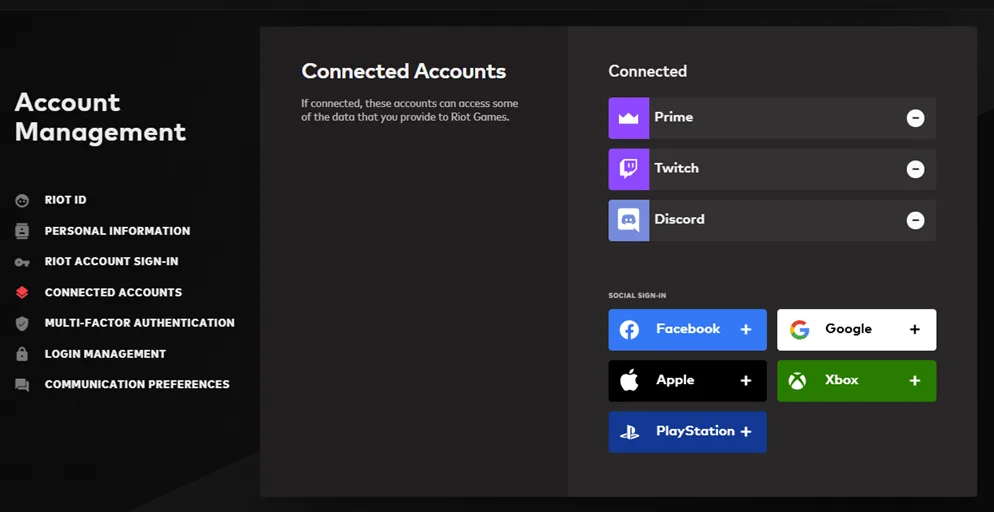
How to link Riot and Discord from Riot Account Management
This method works without opening League. Start on Riot’s official Account Management page and sign in to the Riot account you actually use for LoL.
- Sign in at account.riotgames.com with your Riot account credentials.
- Scroll to the Connected Accounts section.
- Select the Discord button.
- Log in to the intended Discord account if asked, review the requested permissions, and approve the connection.
- Return to Connected Accounts to confirm the Discord connection is listed.
If you manage several LoL accounts, confirm you are signing in to the right one before authorizing Discord. Your Riot ID and League display name identify the account that friends will see, but linking does not change either one.
How to connect Discord from the League of Legends client
Prefer to do it inside League? Riot’s League-specific account-linking instructions describe this route:
- Open League of Legends and sign in to the Riot account you want to link.
- Open Add Friends from the client’s social panel.
- Select Connect Discord Account.
- Follow the Discord authorization prompts, logging in if required.
- Check the friends list for eligible Discord friends who have linked their accounts.
The button may be missing when the integration is not supported in your region or your clients need an update. You can try the Account Management method first, then use the troubleshooting checks below if the new social features still do not appear.
How to connect Riot Games through Discord
You can also start from Discord itself. This is convenient if Discord is already open and you want to review which accounts are connected to your profile.
- Open the Discord desktop app and select User Settings.
- Choose Connections.
- Select the Riot Games fistbump logo. You may need to choose View More to find it.
- Authenticate with the correct Riot account and confirm the connection and permissions.
- Check that Riot Games now appears in your Discord Connections list.
You do not need to complete all three methods. One successful authorization is enough, and you can check the connection from either platform afterward.
How Discord friends, invites, and join links work
Which Discord friends appear in the League friends list?
The integrated friends list shows Discord-only friends when you are actually added as Discord friends, they have a Riot ID, and they have linked their own Riot and Discord accounts. Sharing a server or voice channel alone does not meet those requirements.
There is also a difference between Discord-only friends and people already on your Riot friends list. Linked Riot friends can show Discord names and statuses even if the two of you are not Discord friends. Riot’s integration also allows you to add a Discord friend as a Riot friend without manually exchanging IDs. Removing a Riot friend does not automatically remove the friendship on Discord.
Riot’s linking support guide also sets a maximum of 375 people on the integrated Riot friends list. If you have reached that limit, removing an unused Riot friend may make room for someone new; linking accounts does not remove the cap.
How do players join a League party from Discord?
An invitation can arrive as a Discord message with a joining action, and Discord can update the message as the party changes. If the League lobby has already started a game or disbanded, its invitation expires and may show Launch Game instead of a working join action. That does not recreate the old lobby.
- From League: invite an eligible Discord friend from the social panel, or share a lobby link.
- From Discord: use the available game-invite action for a friend or send the party link into a chat or server channel.
- If the lobby is gone: ask the party owner to create a fresh lobby and send a new link rather than retrying the expired invitation.
Discord account linking makes invitations easier, but it does not bypass League’s game-region requirements. Players still need to be able to join the same League server and queue.
How to unlink, relink, or change your connected Riot account
Older Discord connections mainly shared Riot activity outward to Discord. The newer integration works in both directions, so Riot says previously linked users need to unlink and reconnect to receive all the newer friend and party features. A Legacy entry is not proof that the replacement connection is working.
- Open Riot Account Management, then find Connected Accounts.
- Use the minus (-) control beside Discord to unlink it. Alternatively, open Discord User Settings > Connections and remove the Riot Games connection with the X control.
- Sign in to the Riot account you want to use and repeat one of the linking methods above.
- Restart the clients and check whether the expected Discord friends appear.
One-to-one limit: a Riot account can be linked to only one Discord account at a time, and a Discord account can be linked to only one Riot account. You can unlink and relink later, but there is no way to attach several Riot IDs simultaneously to one Discord profile.
Unlinking stops the connected-friends experience, so Discord-only friends should no longer appear through the integration. If outdated friend information remains on screen, sign out of League and Discord and relaunch the clients so their social lists refresh.
Fix Discord linking, missing friends, and failed invitations
Start with the least disruptive fixes. Riot recommends signing out, fully closing Discord, the League client and the Riot Client, then reopening them so updates complete. There is generally no reason to reinstall League just because a Discord invite does not appear.
| Problem | First thing to check | Next step |
|---|---|---|
| Connect Discord Account is missing | Confirm that the feature is supported in your region and that the clients are up to date. | Try connecting through Riot Account Management instead. |
| Discord friend does not appear | Confirm you are Discord friends and that they have a Riot ID. | Ask them to link their own Riot and Discord accounts. |
| Invite cannot be accepted | Check whether the party still exists and whether the friend has updated Discord and Riot Client. | Close and relaunch both applications, then send a fresh invite. |
| Old connection shows “legacy” | The earlier one-way account connection may still be listed. | Unlink the old connection and complete the current linking flow. |
| Wrong Riot account is connected | Check Connected Accounts to see which Riot ID was authorized. | Unlink it before linking the intended account. |
| Sign-in or authorization fails | Check that the correct Riot and Discord accounts are signed in. | Sign out, close the clients, and try again; contact Riot Support if it persists. |
| Linking is broken while Riot Client runs | Old Riot Client processes may be running in the background. | On Windows, close remaining Riot Client processes in Task Manager and reopen the client. |
| Invite link expires or says Launch Game | The original party may already have started a match or disbanded. | Create a fresh lobby and send a new invite instead. |
| Opening invite links crashes the client | Repeatedly opening many invite links can trigger a Riot Client issue. | Stop retrying the links in quick succession and leave a pause before trying again. |
| A new Discord friend cannot be added | The integrated friends list may already contain 375 people. | Remove an unused friend if needed, then try adding the intended person. |
If the basic restart fails on Windows, check for lingering Riot Client processes in Task Manager. Close Riot Client processes, then launch Riot Client normally again. Riot lists this as a workaround for Discord integration problems. Avoid terminating unrelated Windows services or changing firewall settings to fix a missing Discord connection.
For unresolved issues, follow Riot’s account-linking support guide or open a Riot Player Support ticket. Riot can assist with unlinking the services after an account compromise, but if your Discord account itself has been taken over, you must contact Discord Support for Discord account recovery.
If you cannot log in to League at all, the failure may be unrelated to Discord. Check RiftDaily’s League server status guide for service incidents and LoL download and client setup guide if your installation needs attention.
Where Riot and Discord linking works: regions, platforms, and VALORANT
Riot initially tested League linking with players in the United States, Canada and Brazil in May 2026. Those countries describe the initial beta, not an up-to-date list of every supported region. Riot’s current main linking page says the new features are available in regions where both Riot and Discord are supported. Access can differ during the transition, so an unavailable button does not necessarily mean the account is defective.
Riot’s League support page documents the integration on Windows PCs and Macs. Mac players need the Discord desktop app. On Windows, Discord’s web version can receive invitations and show updates, but Riot says accepting game invitations requires the desktop app. There is no confirmed equivalent full-featured mobile flow in Riot’s League linking instructions.
This is distinct from League server selection. Even when two accounts are linked, they must still meet normal League regional and queue requirements before they can join the same party. RiftDaily’s League of Legends news coverage tracks additional Riot social-feature announcements.
The same linked Riot account also covers VALORANT, provided you use the same Riot ID. Riot’s official integration page names both games as supported and says it hopes to expand the feature to more Riot titles. Linking does not grant cross-region matchmaking or automatically enable the integration in every game.
What Riot and Discord share when you link accounts
Riot says the integration shares information needed to support friend discovery, game status, and party invitations. Depending on the feature, that can include your Riot ID, Discord display name or account ID, the game you are playing, match time and score, and party size or status.
Discord displays the permissions before you approve the connection, and you can revoke the link in Riot Account Management or Discord Connections later. Only authorize the link from Riot’s official account website, the game client, or Discord itself; unrelated websites asking for your Riot password are not part of this setup.
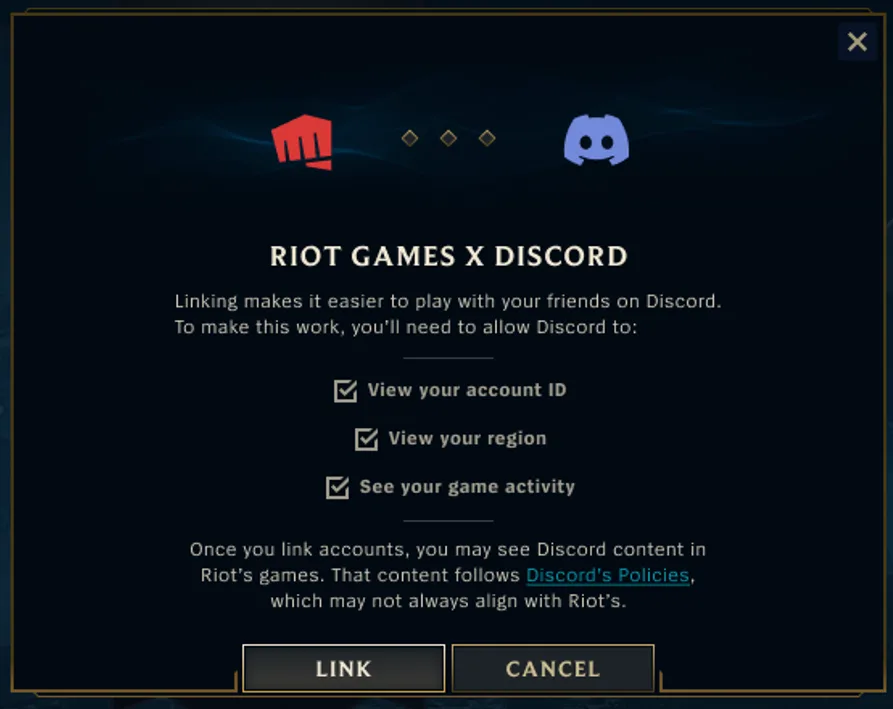
The connection is optional: you can play League without it. It also does not move Discord text or voice channels into the League client. Riot says no Discord chat integration is currently planned; League’s existing party voice and the separate League Team Voice project are different features.
How to join the official League of Legends Discord server
You do not have to join any specific Discord server to link accounts. If you want to find other players, Riot lists the official League of Legends Discord server on its League community page. Being in that server alone will not add everyone to your linked League friends list.

Frequently asked questions about League of Legends account linking
How do I link my League of Legends account to Discord?
Open Riot Account Management, sign in, find Connected Accounts, and choose Discord. You can also select Connect Discord Account from League’s Add Friends panel or connect Riot Games in Discord Settings > Connections.
Why does my Discord party invitation say Launch Game?
The lobby may no longer exist because the party entered a match or disbanded. The old invitation no longer joins that lobby. Ask the party owner to send a new link from an active League lobby.
Is Discord account linking available in every LoL region?
Not necessarily. The initial beta started in the United States, Canada, and Brazil, but Riot’s current guidance describes availability by whether Riot and Discord are supported in your region. Riot does not provide a complete current country-by-country list on its main linking page.
Can I link two Riot accounts to one Discord account?
No. Riot allows a one-to-one connection between Riot and Discord accounts. Unlink the current account before connecting a different Riot ID.
Why are my Discord friends missing from League?
For Discord-only friends, both players must be Discord friends, have Riot IDs, and link their Riot and Discord accounts. Sharing the same Discord server is not sufficient.
Do I need to link Discord again for VALORANT?
No. If you use the same Riot ID for League and VALORANT, Riot says one successful Discord connection works for both supported games.
How do I unlink Discord from League of Legends?
Sign in to Riot Account Management, open Connected Accounts, and remove Discord. Alternatively, remove the Riot Games connection under Discord User Settings > Connections. You can then reconnect a different account.
Does linking Discord add Discord chat or voice to the League client?
No. Riot has not announced Discord chat or voice as part of this LoL integration. It focuses on account connections, friend visibility, activity status, and party invitations.
Keep your League and Discord friends connected
For most players, Riot Account Management is the clearest starting point because it shows which account is connected and gives you a way to correct a mistaken link. The social panel becomes more useful once friends complete their own linking steps, but the formal Discord-friend requirement and 375-friend cap still apply. A missing join option often traces back to an expired invitation, a friend who has not linked, or an outdated client rather than a broken League account.
If the connection works but League itself will not start, begin with the League server status checks and the installation and client guide before making larger changes. You can also browse RiftDaily’s League guides for related account and client tasks, or follow the League news hub for further official integration updates.