League of Legends PBE (Public Beta Environment) is Riot Games' free test server for upcoming champions, skins, balance changes and experimental features. Anyone can create a PBE account under Riot's current signup rules. To play, register through Riot's PBE website, sign in to the Riot Client with your PBE account, then select League of Legends PBE from the arrow beside the Play button.
The important catch is that PBE isn't your regular League server with early updates switched on. It uses a separate account, has its own test progression and can be taken offline while Riot changes builds. Here's how to get access, install the correct version and work out what's wrong when it won't launch.
How to create a League of Legends PBE account
Riot does not require a particular Honor level, summoner level or invitation to sign up for PBE. Riot's Public Beta Environment FAQ says there are no PBE-specific signup requirements. Riot's ordinary account rules, including applicable age and conduct policies, still apply. Older guides that require Honor Level 2 or 3, a particular live-account level or an invitation are out of date. The League of Legends Honor system still matters for player behavior, but Honor level is not a PBE registration gate.
- Open Riot's official League of Legends PBE page.
- Select Sign Up for PBE to enter Riot's registration flow.
- Follow the prompts to create a new Riot account for PBE. Do not assume signing into your existing live League account automatically grants it PBE access.
- Complete the requested account details and any verification steps shown by Riot.
- Keep track of the login credentials for the PBE account. You will need them when signing into the Riot Client.
- Open the Riot Client, sign out of your live account if necessary, and sign in with the PBE credentials to confirm access.
| Question | Current PBE rule |
|---|---|
| Minimum Honor level | None required for signup. |
| Invitation or beta key | Not required for standard PBE account creation. |
| Existing live League account | You need PBE account credentials, not just your normal live-server login. |
| Region | Players outside North America may join, although the PBE server is hosted in North America. |
| Account sharing | Not permitted. Riot warns that sharing a PBE account can lead to suspension. |
| Behavior penalties | Riot's conduct rules still apply; punishments can affect both PBE and live accounts. |
PBE account, login username and Riot ID are different things
A PBE account is a separate Riot account for the test environment. Your usual live-server username does not automatically become your PBE username, even if you use similar profile details. Riot requires login usernames to be globally unique across its accounts, including PBE. Your Riot ID, the name other players see in-game, is not necessarily the username you enter on the sign-in screen. Riot explains this in its global username FAQ.
If you have several Riot accounts and cannot remember which username belongs to PBE, use the official Riot username recovery tool. Check the account associated with the PBE registration rather than repeatedly resetting the password on your live account. Never share either account with another player, including someone who only wants to try an unreleased skin.
What to do if PBE signup opens the wrong account
The PBE signup page and the Riot Client can remember separate sign-in sessions. If you are redirected to a familiar live account, first sign out on the website, reopen the official PBE registration page and confirm which account is shown. A private browser window is useful for separating sessions; it does not grant PBE access or change Riot's eligibility rules. Finish account creation before trying the game version selector.
How to download and install League of Legends PBE
You no longer need a completely separate PBE launcher. Riot's current PBE installation instructions direct players to the standard Riot Client, where the League of Legends PBE version is selected from the Play menu. Riot also provides an official PBE download page with Windows and Mac installers if you're starting without the required software. That download is a route into PBE installation, not evidence that you must run two independent launchers.
- Install or open the Riot Client on your computer.
- Sign in with the credentials for your PBE account, not the account you normally use for live matches.
- Select League of Legends in the Riot Client.
- Click the small downward arrow to the right of Play.
- Choose League of Legends PBE.
- If prompted, let the Riot Client download, install or patch the PBE game files. PBE and live game builds can differ, so allow the selected build to finish updating before launching.
- Press Play to start the selected test version. If the client asks you to select a game location or finish first-time setup, follow its prompts.

Installing PBE on Windows
If the Riot Client is already installed, use the account-and-version steps above first. For a fresh install, choose Download on Windows on Riot's PBE download page, run the installer and let the Riot Client finish any required downloads. Keep sufficient free storage for the game files and subsequent patches; the required space varies by version.
For general installation issues unrelated to PBE account access, follow RiftDaily's League of Legends download guide. Avoid third-party PBE installers, which aren't necessary and can introduce account or security risks.
Installing PBE on Mac
Riot's official PBE download page also offers Download on Mac. Open the Mac installer, complete the installation and sign into the Riot Client using your PBE account. Select League of Legends PBE through the same version menu and allow any required files to download before launching. If your Mac does not meet the game's current system requirements, changing account or server will not resolve a compatibility problem.
How to switch between PBE and live League
Close the running game, open the Riot Client and switch to the appropriate account. Use your PBE login for PBE and your regular Riot login for your live region. Then select the desired League version in the client if it offers a version choice. The same Riot Client can manage access to both environments, but their account credentials and game data are not interchangeable.
How to confirm you launched PBE instead of live League
Check the selected game label in the Riot Client before clicking Play. It should say League of Legends PBE rather than only the live version. If your normal rank, collection or live-server friends appear and the expected PBE test is absent, return to the Riot Client and check both the signed-in account and version. A missing champion or skin by itself is not definitive: Riot can temporarily disable PBE content while it is being tested.
League of Legends PBE is a computer test environment, not a mobile version of League. If you are looking for a phone game, Wild Rift is a separate title and does not use the League PC/Mac PBE signup and installation flow.
What is League of Legends PBE used for?
PBE stands for Public Beta Environment. It gives Riot a place to deploy unfinished League of Legends changes for wider testing before deciding what belongs in a live patch. Players help uncover crashes, balance problems, unexpected interactions and bugs that internal testing may miss.
- Champions and reworks: testing ability behavior, effects, responsiveness and interactions with other champions.
- Skins and cosmetics: checking models, animations, visual effects, audio, shop behavior and other presentation details.
- Balance and systems: experimenting with item adjustments, map rules, champion tuning and underlying gameplay systems.
- Modes and larger experiments: testing temporary game modes, client changes and, when applicable, upcoming Teamfight Tactics content.
PBE is not a release announcement. A champion change can be revised several times, a feature can be disabled mid-test and an experiment can be abandoned without ever appearing on a live server. Even a promising PBE build can differ substantially from the final patch notes. A PBE tooltip, cosmetic effect or balance number is a snapshot of an unfinished build, not a reliable record of what your live game will become.
Riot uses PBE builds to prepare upcoming updates, while live patches follow their own published rollout calendar. For confirmed dates, use the League of Legends patch schedule and Riot's official patch schedule. Once a release lands, RiftDaily's League of Legends patch notes archive explains the changes that actually shipped.
League of Legends PBE vs live servers
The PBE and regular League may look similar once you enter a match, but they serve very different purposes. PBE lets you test a developing build; the live server is where your long-term account progression and normal matchmaking matter.
| Feature | PBE server | Live League servers |
|---|---|---|
| Purpose | Testing upcoming or experimental features and finding issues. | Playing the released version of League. |
| Content | May include unreleased changes; availability can change without notice. | Contains content officially released in your region. |
| Stability | More bugs, disabled features and maintenance are expected. | Designed for normal ongoing play, though outages can still occur. |
| Account and progression | Separate PBE account and test progression; ranked results do not carry into live. | Normal regional account progression, ratings and rewards. |
| Matchmaking | Smaller population can produce longer waits and less balanced matches. | Larger regional matchmaking populations. |
| Purchases | PBE-only RP from missions; content can still have store prices. | Regular purchases and account entitlements for your live region. |
| Rewards and inventory | Test cosmetics, currency and progress stay in the PBE environment. | Live cosmetics, currency and eligible rewards remain on the live account. |
| Server location | Hosted in North America, even for players from other regions. | Regional servers with their own locations and latency. |
Your live skins, RP, Blue Essence, rank and other normal account progress do not automatically carry over to PBE, and PBE items do not transfer back to live servers. Treat anything unlocked in the test environment as part of that separate account. The PBE also follows Riot's League of Legends Code of Conduct; testing is not an exception to player-behavior rules.
PBE server status, maintenance and patch updates
PBE can update far more frequently than the regular League patch cycle. Riot describes regular weekday maintenance and PBE patch releases, generally Monday through Friday between 11:30 a.m. and 1:00 p.m. Pacific Time, with interruptions that may temporarily prevent logins or disable content. That is an indicative maintenance window, not a promise that every update will follow an identical schedule. Its support FAQ says maintenance commonly lasts an hour or two, but the actual timing and duration can vary. A PBE outage doesn't necessarily mean the live League servers are down.
How to check whether PBE is down
- Open Riot Games Service Status with the PBE region selected.
- Check League of Legends under the PBE region for current service notices and recently closed incidents.
- Read the League of Legends PBE community discussions for testing threads and reports from other players; keep confirmed service notices separate from community reports.
- If no incident is posted, check your selected game version, account and connection before attempting a reinstall.
For broader service diagnosis, RiftDaily's League of Legends server status guide explains how to separate a regional outage from a local problem. For changes still being tested, keep PBE discussions separate from confirmed League of Legends leaks and early reports: a PBE sighting is evidence of a test, not proof of a future release.
Where to follow PBE changes before a live patch
Riot points testers to r/LeaguePBE for discussions of test changes, feedback threads and bug reports. It is a community-run space monitored by Riot staff, not a substitute for Riot's live patch notes. PBE updates may be revised or rolled back between builds, so compare a claim with what is playable in the client and wait for the published live patch notes before treating it as a final change.
The PBE service-status page linked above is the better place to check immediate availability. A login error during announced maintenance is not a reason to delete the installation.
Why PBE login queues and ping can be high
When a popular champion, mode or other test goes live, PBE may receive more logins than it can admit immediately. Riot uses login queues to manage demand, and its FAQ warns that the estimated wait time may stop updating when capacity is reached. A long queue does not automatically mean anything is wrong with your account.
Riot hosts the PBE environment in North America. Players connecting from Europe, Asia, Oceania and other distant regions should expect more network latency than on nearby live servers. A stable connection can reduce packet loss, but changing graphics settings cannot eliminate the physical distance to the PBE server. Matchmaking may also take longer because the PBE player population is smaller.
How PBE RP, champions and skins work
You do not need to spend real money to participate in PBE testing. Riot provides a repeatable in-client mission that awards RP for the PBE store. Its official PBE information page describes a daily mission worth 3,000 PBE RP when completed. That RP is meant for testing content and cannot be moved to your live account. The mission is completed inside PBE; check its current objective and availability in your client instead of relying on outdated screenshots of mission wording.
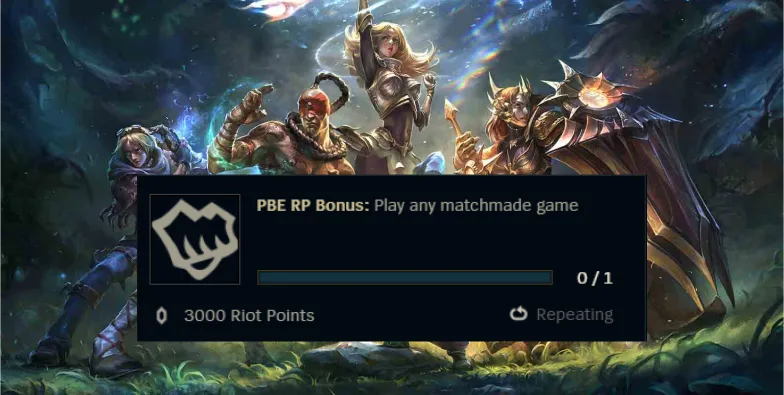
Content in the PBE store can still show its in-game price. Riot's support FAQ says both current and new content are available for their in-game prices, so don't assume that every champion, skin, chroma or other item is permanently unlocked for free. Inventory and test availability can change, especially while Riot is preparing a particular feature. A featured skin can be listed before its test is fully enabled, removed while it is being fixed or unavailable to purchase at a given moment.
- Check the PBE missions tab for the current repeatable RP reward and its completion conditions.
- Check the PBE store to see whether the specific champion, skin or cosmetic you want to test is available and what it costs.
- Don't buy for your live account here. Currency earned and purchases made on PBE belong to the test environment.
- Expect some test content to disappear or change. Temporary access is not a promise that an item will be released or remain available.
What PBE purchases and test progression actually mean
Earning PBE RP is not the same as receiving a real-money credit. It is currency for experiments within that account. Similarly, a skin acquired for a PBE test is not a voucher or ownership entitlement for your main League collection. If you want a cosmetic on your normal account, obtain it through the live game's own store or reward system.
Normal ranked progress and rewards are also separate. Riot expressly notes that PBE ranked matches do not count toward your regular competitive record. If your goal is to climb or preserve permanent rewards, play your home-region live server instead.
How to fix League of Legends PBE not working
Most PBE problems fall into four groups: the wrong account, the wrong League version, a local installation or connection issue, or server-side maintenance. Match the exact error to its likely cause before reinstalling anything. The most useful first check is whether you can reach Riot's PBE service-status page: a confirmed test-server outage affects many players, whereas an error only on your device usually calls for account or local-client checks.
| Problem or message | Likely cause | What to do |
|---|---|---|
| PBE is missing from the Riot Client | Wrong login, selected game or outdated client session. | Sign out completely, sign in with the PBE account, open League of Legends and check the arrow beside Play. Update or restart the client if necessary. |
| “PBE is not available for your current account” | A live account is signed in, or PBE registration was not completed. | Use the official signup page to create the PBE account, then switch to those credentials in Riot Client. Contact Riot Support if an established PBE account still fails. |
| PBE shows a region-availability message | The Riot Client may be opening the live version, or there may be an account routing or access problem. | Check the Riot Client account and switch to League of Legends PBE. Riot permits overseas PBE testing, so do not assume this message means all players in your country are blocked. Contact Riot Support if the correct PBE credentials still fail. |
| Wrong server or regular League opens | Live account or version selected. | Exit the game, confirm the active account and choose League of Legends PBE rather than the live version. |
| Repeated username update or login loop | Riot account username may need to be unique or a saved session may point to the wrong account. | Check which account is signed in; use Riot's official recovery or global username guidance rather than changing your primary account by guesswork. |
| Login failed or password forgotten | Incorrect PBE credentials or authentication trouble. | Use Can't Sign In? on Riot's login screen and recover the correct PBE account; then retry after checking service status. |
| Long or apparently frozen login queue | Heavy demand on the test server. | Wait and check Riot's PBE status. The displayed queue estimate can be inaccurate at capacity; repeatedly restarting will not increase server capacity. |
| PBE shows Unavailable or Maintenance | Server-side update or outage. | Check the PBE region on Riot Games Service Status and return when access is restored. Reinstalling won't end maintenance. |
| Download or patch keeps failing | Interrupted download, storage, permissions or damaged files. | Restart Riot Client, verify available disk space and connectivity, then use Riot's client repair options if offered before attempting a reinstall. |
| Client crashes or won't launch | Local software, drivers, corrupt files or a PBE build problem. | Restart your PC or Mac, update the client and operating system, check Riot support guidance and test whether live League also crashes. |
| Disconnects, high ping or lag | Long distance to North America, packet loss or local network trouble. | Try a stable wired connection, stop heavy background downloads and compare PBE with your live-region connection. Expect some extra PBE latency. |
| VAN or Vanguard error on Windows | Anti-cheat or system security requirements are not satisfied. | Record the exact VAN code and follow Riot's code-specific guidance rather than disabling security features or guessing at BIOS settings. |
| A champion, mode or skin is unavailable | Limited PBE test, disabled feature or incomplete content rollout. | Check the client, Riot notices and current PBE discussion. Content may appear later, change or be removed. |
Fix “PBE is not available for your current account”
This message usually calls for an account check, not a reinstall. Riot requires you to sign into the Riot Client using the PBE account. Opening a PBE install while your usual live account is authenticated won't turn that live login into a PBE account.
- Close League and sign out of the Riot Client.
- Confirm that you completed PBE registration through Riot's official page.
- Sign back in with the PBE username and password.
- Open League of Legends and select the PBE version beside Play.
- If the problem persists, check Riot's PBE service status, then submit a Riot Support ticket with the exact error and account details requested by support. Never post your password.
Recover a forgotten PBE login without changing your live account
- At the Riot sign-in screen, use Can't Sign In?, or open Riot's username-recovery page if the username itself is missing.
- Identify the login username connected to your PBE account, remembering that the visible Riot ID is not the same field.
- Complete the official recovery process and sign out of any saved live-server session in the Riot Client.
- Log in using the recovered PBE details, select League of Legends PBE and retry. If the account is suspended or the error remains, request help from Riot Support.
Account recovery and server downtime are different problems. Resetting your password can repair an authentication issue, but it cannot move your live account into PBE or shorten a test-server login queue.
Fix failed updates and client crashes
If the client can authenticate but can't download, start with the simplest checks: close and reopen Riot Client, check available storage, confirm the connection is stable and let any queued Riot updates finish. Riot documents a Riot Client Full Repair Tool: sign in, click your profile icon in the upper-right corner, choose Settings, select the affected game and use Repair. Follow the prompts and let the scan finish before you try the game again. This addresses damaged or missing local files, not a server outage. Only consider removing and reinstalling the affected game files after less disruptive fixes fail; RiftDaily's League of Legends uninstall guide explains how to avoid deleting more than intended.
For a Windows VAN code, identify the specific error first. Riot's Vanguard connection guidance explains why background software and security services can matter, but a code-specific fix is safer than changing system settings blindly. RiftDaily's Vanguard error code guide covers code-dependent fixes. If the game launches but runs poorly, try the practical graphics and control adjustments in our best League of Legends settings guide; lower graphics settings can help client performance, not a geographically distant PBE connection. More general issues are collected in the League troubleshooting hub.
How to report PBE bugs and give Riot feedback
The PBE works best when players report what broke, not just that something feels wrong. A test report about an ability interaction, store purchase or visual effect is much more useful when Riot can reproduce it on the same kind of build. Riot's current FAQ points to the Bug Report button in the bottom-right corner of the League client, the League bug-reporting tool and discussions on r/LeaguePBE. Riot also offers a general bug-reporting support guide for cases where a ticket is more appropriate.
- Give the issue a precise title. For example, name the champion, mode and specific interaction rather than writing only “PBE broken.”
- Record the steps to reproduce it. Explain what you clicked, bought, cast or entered, and in what order.
- Separate expected and actual behavior. Explain what should have happened and what the PBE actually did.
- Include useful context. Note whether it happened every time, what game mode and platform were involved, and whether it started after a recent PBE update.
- Attach evidence when possible. Screenshots, short videos, error messages and logs can help Riot reproduce the problem. Keep private account information out of public posts.
- Look for an existing report. On the PBE subreddit, add findings to an existing relevant thread rather than splitting the same bug across many posts.
For example: If a new skin's recall animation appears to stop after you trigger recall twice in quick succession in Practice Tool, describe that exact sequence rather than writing “the skin is broken.” State the animation you expected to see, what happened instead and whether the same issue occurs with the base skin. Only claim the bug reproduces consistently if you have actually repeated the test.
For feedback that is not a technical defect, describe what you tested and why it felt confusing or unfair. A clear explanation of an interaction is more actionable than demanding a buff or assuming the current PBE values are final.
Riot Games Support's video Sending a League Bug Report shows the information its QA team needs, including reproduction steps, screenshots and the difference between expected and actual behavior. The video predates the current Riot Client interface, so follow the current in-client reporting route above.
Feedback about balance, visuals and how a feature feels belongs in the relevant PBE subreddit discussion. Riot says its developers monitor feedback there, though a post isn't a guarantee that the requested change will happen. The PBE is a test environment, not a promise that every previewed feature will launch.
Frequently asked questions about League of Legends PBE
Is League of Legends PBE free?
Yes. Creating a PBE account and testing League content are free. Riot offers a repeatable mission for PBE-only RP, although content in the test store can still have in-game prices.
Can anyone create a PBE account?
Yes. Riot's current PBE FAQ lists no signup requirements. Old Honor-level and invitation restrictions should not be treated as current rules, but Riot's account and conduct policies still apply.
Do you need a separate account for PBE?
Yes. You need PBE account credentials to enter the test environment. The regular Riot Client handles both versions, but logging into your ordinary live account alone does not grant PBE access.
Can you play League of Legends PBE outside North America?
Yes. You can create a PBE account from outside North America. Because the PBE servers are hosted in North America, distant players should expect higher latency than on their usual regional servers.
Why is my PBE ping so high?
The main reason is often distance from Riot's North American PBE servers. A wired, stable connection may reduce extra packet loss, but it cannot remove the travel time between distant regions.
Do PBE skins and RP transfer to live League?
No. PBE-earned RP, test purchases, skins and progression belong to the separate test environment. They do not unlock those items or add currency to your live League account.
How often does PBE update?
Riot makes frequent changes and describes generally weekday PBE maintenance and patch releases. Test builds may change between normal live patches, and exact downtime is not guaranteed.
Why can't I log in to PBE?
Check whether you're using your PBE account rather than your live login, then confirm League of Legends PBE is selected in Riot Client. If those are correct, check the PBE service status for maintenance, a full login queue or an outage before changing your installation.
Ready to test on PBE? Choose the right next step
If you want to try an unreleased champion, inspect a cosmetic or find a bug before a live patch, start with the official PBE signup page, enter through the Riot Client and check for active test content. Keep your PBE credentials separate from your live login, remember that frequent downtime is normal, and don't treat a successful test as confirmation of a release. Useful feedback focuses on what happened, how to reproduce it and what Riot should have seen instead.
If your priority is learning League or making permanent progress, the live environment is the better place to play. Start with RiftDaily's League of Legends beginner guide, then use the patch schedule to see when tested changes are due to reach regular servers. Use PBE for experimentation and live League for the account, purchases and competitive results you intend to keep.