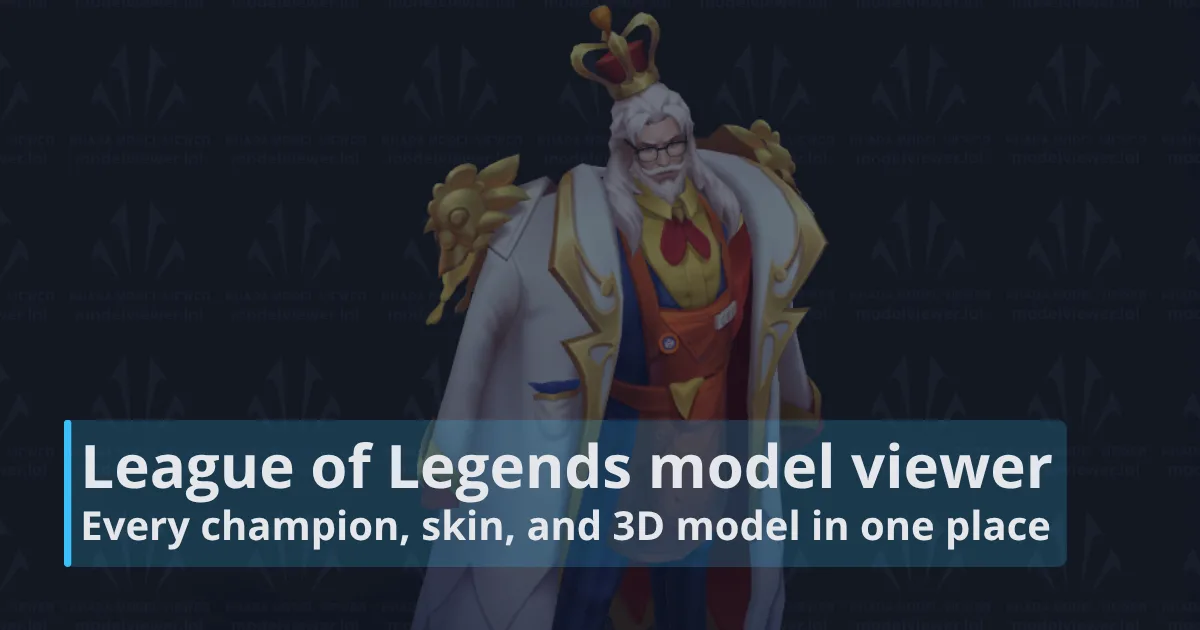
A LoL model viewer lets you inspect League of Legends champions, skins, chromas, and alternate forms as interactive 3D models. You can rotate, pan, and zoom the model, switch between available variations, and inspect details that splash art cannot show from a single angle.
For most players, the useful part is comparison. A 3D viewer makes it much easier to judge a skin's silhouette, colors, weapon shape, proportions, and smaller model changes before you spend RP or use the design as a reference for art, cosplay, thumbnails, or other creative work.
LoL model viewer: quick answer
If you just want the essentials, the table below gives you a quick overview of what the LoL model viewer can do, which platforms it supports, and what you can inspect before opening a champion or skin.
| Best all-around option | Khada at modelviewer.lol |
|---|---|
| Current champion roster | 173 champions, including Locke, Yunara, and Zaahen |
| What you can inspect | Champions, skins, chromas, alternate forms, animations, variations, and model parts where available |
| Platforms | Web, iPhone/iPad, and Android |
| Can you export models? | Yes. Khada provides model export options, including textures and animations for supported assets |
| Official Riot tool? | No. Khada is a fan-made project and is not endorsed or sponsored by Riot Games |
For a closer look, use the full champion roster below to jump directly to any champion and compare their base model, skins, chromas, and alternate forms in 3D.
LoL model viewer champion roster: all 173 champions
League now has 173 champions. The roster below links every current champion directly to their Khada page, including newer additions such as Locke, Yunara, and Zaahen.
Use the A-Z shortcuts to jump to a champion, then select their name to open the 3D viewer and browse the available base model, skins, chromas, and alternate forms.
A
 Aatrox
 Ahri
Ahri
 Akali
Akali
 Akshan
 Alistar
 Ambessa
 Amumu
Amumu
 Anivia
 Annie
Annie
 Aphelios
 Ashe
Ashe
 Aurelion Sol
 Aurora
 Azir
Azir
B
 Bard
Bard
 Bel'Veth
 Blitzcrank
 Brand
Brand
 Braum
Braum
 Briar
Briar
C
 Caitlyn
 Camille
 Cassiopeia
 Cho'Gath
 Corki
Corki
D
 Darius
 Diana
Diana
 Dr. Mundo
 Draven
E
 Ekko
Ekko
 Elise
Elise
 Evelynn
 Ezreal
F
 Fiddlesticks
 Fiora
Fiora
 Fizz
Fizz
G
 Galio
Galio
 Gangplank
 Garen
Garen
 Gnar
Gnar
 Gragas
 Graves
 Gwen
Gwen
H
 Hecarim
 Heimerdinger
 Hwei
Hwei
I
 Illaoi
 Irelia
 Ivern
Ivern
J
 Janna
Janna
 Jarvan IV
 Jax
Jax
 Jayce
Jayce
 Jhin
Jhin
 Jinx
Jinx
K
 K'Sante
 Kai'Sa
 Kalista
 Karma
Karma
 Karthus
 Kassadin
 Katarina
 Kayle
Kayle
 Kayn
Kayn
 Kennen
 Kha'Zix
 Kindred
 Kled
Kled
 Kog'Maw
L
 LeBlanc
 Lee Sin
 Leona
Leona
 Lillia
 Lissandra
 Locke
Locke
 Lucian
 Lulu
Lulu
 Lux
Lux
M
 Malphite
 Malzahar
 Maokai
 Master Yi
 Mel
Mel
 Milio
Milio
 Miss Fortune
 Mordekaiser
 Morgana
N
 Naafiri
 Nami
Nami
 Nasus
Nasus
 Nautilus
 Neeko
Neeko
 Nidalee
 Nilah
Nilah
 Nocturne
 Nunu & Willump
O
 Olaf
Olaf
 Orianna
 Ornn
Ornn
P
 Pantheon
 Poppy
Poppy
 Pyke
Pyke
Q
 Qiyana
 Quinn
Quinn
R
 Rakan
Rakan
 Rammus
 Rek'Sai
 Rell
Rell
 Renata Glasc
 Renekton
 Rengar
 Riven
Riven
 Rumble
 Ryze
Ryze
S
 Samira
 Sejuani
 Senna
Senna
 Seraphine
 Sett
Sett
 Shaco
Shaco
 Shen
Shen
 Shyvana
 Singed
 Sion
Sion
 Sivir
Sivir
 Skarner
 Smolder
 Sona
Sona
 Soraka
 Swain
Swain
 Sylas
Sylas
 Syndra
T
 Tahm Kench
 Taliyah
 Talon
Talon
 Taric
Taric
 Teemo
Teemo
 Thresh
 Tristana
 Trundle
 Tryndamere
 Twisted Fate
 Twitch
U
 Udyr
Udyr
 Urgot
Urgot
V
 Varus
Varus
 Vayne
Vayne
 Veigar
 Vel'Koz
 Vex
Vex
 Vi
Vi
 Viego
Viego
 Viktor
 Vladimir
 Volibear
W
 Warwick
 Wukong
X
 Xayah
Xayah
 Xerath
 Xin Zhao
Y
 Yasuo
Yasuo
 Yone
Yone
 Yorick
 Yunara
 Yuumi
Yuumi
Z
 Zaahen
 Zac
Zac
 Zed
Zed
 Zeri
Zeri
 Ziggs
Ziggs
 Zilean
 Zoe
Zoe
 Zyra
Zyra
Some champions are especially useful to inspect this way because their appearance changes during play. Kayn, for example, has major form changes, while champions such as Nidalee, Elise, Gnar, and Shyvana have transformations that are hard to understand from one static image. Availability varies by model, but Khada groups supported variations and alternate forms on the relevant pages.
What is a LoL model viewer?
A League of Legends model viewer displays the game's champion and skin assets in an interactive 3D scene outside the LoL client. Instead of judging a cosmetic from a painted splash image, you can move around the model and inspect it from the front, back, sides, and close up.
The most complete option we found is modelviewer.lol, which is now branded as Khada. Its library covers champions and skins as well as chromas and alternative forms, and individual model pages can include animations, variations, model parts, export tools, splash art, stats, wiki links, and a spotlight.
That makes it useful for two different jobs: quickly checking whether you like a skin's in-game model, and doing more detailed visual reference work when a static image is not enough.
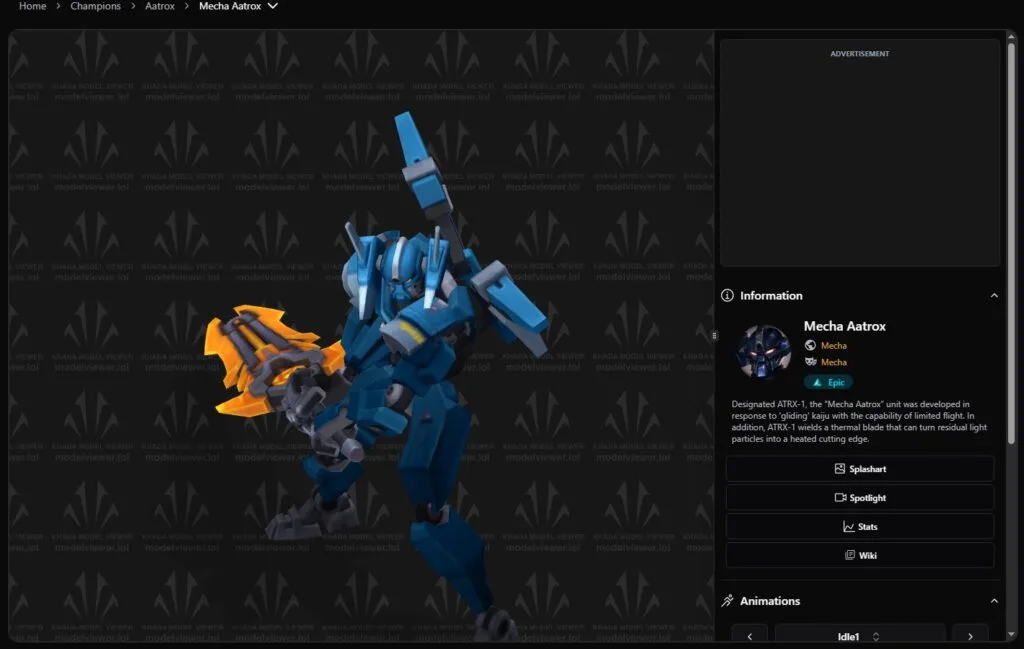
Khada is a community project, not a Riot Games product. If you are looking for the official roster, champion information, or the game itself, use the official League of Legends champion directory.
Why Khada is the most useful LoL 3D model viewer
Khada goes further than a basic rotate-and-zoom preview. Its current model pages expose several layers of information around the 3D asset, so you can move from a quick skin check to a much closer inspection without hopping between a handful of different tools.
| Feature | What it is useful for |
|---|---|
| Champion and skin models | Compare the base champion with individual skins from multiple angles |
| Chromas and alternate forms | See color variants and transformation-heavy models that a single splash image can hide |
| Animations and variations | Check how the model moves and switch between supported versions or forms |
| Model parts and options | Inspect separate components or available display controls on supported models |
| Splash art and spotlight | Compare the 3D asset with the promotional art and a more complete in-game presentation |
| Model export | Download supported 3D assets for reference, 3D printing, or other workflows, subject to Riot's IP rules |
| TFT tacticians | Browse Teamfight Tactics tacticians as well as standard League champions |
| Extras | Explore map objects, monsters, TFT set assets, archived models, original versions, prototypes, and exploratory content |
Khada also says it updates in sync with the League PBE. That can make it useful for looking at newly revealed champions and skins before they reach live servers. Treat anything marked as PBE content as a preview, though, because pre-release assets can still be adjusted before launch.
What a 3D skin viewer shows well, and what it does not
A 3D model viewer is excellent for judging the model itself. You can see the mesh, textures, silhouette, color placement, weapons, clothing, armor, and other geometry from angles that splash art does not provide. It is also much easier to compare small chroma differences when you can keep the same viewing angle and zoom level.
It is not a perfect substitute for seeing a skin in a real match. League's camera distance, map lighting, spell effects, particles, sound effects, voice processing, recalls, emotes, and combat readability all affect how a skin feels in play. If those details matter to your purchase, use the 3D model for the model itself and then check the skin's spotlight or in-game footage for the complete package.
How to compare LoL skins in 3D before buying
- Start with the base champion. Get a quick sense of the default silhouette and proportions before looking at skins.
- Open the skin you are considering. Compare the model at roughly the same angle and zoom so the differences are easier to spot.
- Check chromas and alternate forms. A chroma may change more than its headline color, and transformation-heavy champions can have several distinct models.
- Rotate, pan, zoom, and play animations. Look closely at the back of the model, weapons, hair, armor, and moving parts that are often hidden in store art.
- Finish with a spotlight or gameplay clip. Use it to check spell VFX, sound, recall animations, and how the skin reads from League's normal camera.
This workflow is especially helpful when two skins have similar splash art but very different silhouettes, or when you are deciding whether a chroma changes enough to be worth adding.
LoL model viewer on web, iPhone, and Android
You do not have to be at your gaming PC to use the viewer. Khada is available on the web and also links to dedicated mobile apps for iOS and Android. The basic job is the same on each platform: open a model, move around it, and inspect it in 3D.
| Platform | Best for | Notes |
|---|---|---|
| Web | Fast comparisons, desktop reference work, and exports | No League client required. Open the site in a modern browser and jump straight to a champion or skin. |
| iPhone and iPad | Portable 3D viewing and reference checks | The mobile app advertises 360-degree viewing, animations, multiple forms, and AR features. |
| Android | Portable 3D viewing and AR | The Android listing includes rotate, pan, zoom, animations, forms, and augmented-reality viewing. |
App features can change over time, so the store listing is the best place to check device requirements and the current mobile feature set. For a quick desktop comparison, the browser version remains the simplest place to start.
Can you download League of Legends 3D models?
Yes. Khada lets you download supported League of Legends 3D models and export assets with textures and animations. That makes the viewer useful for more than checking skins in a browser, especially if you need a model for 3D printing, artwork, cosplay reference, thumbnails, or closer study.
| What you need | What Khada provides | Good for |
|---|---|---|
| 3D model | Downloadable model files on supported pages | 3D printing, reference work, and studying champion geometry |
| Textures | Texture data with supported exports | Artwork, material reference, and closer skin inspection |
| Animations | Animation data with supported exports | Studying poses, movement, and animated model work |
| Quick visual reference | Interactive 3D browser viewer | Thumbnails, fan art, cosplay planning, and skin comparisons |
Downloading a Riot asset does not give you unrestricted rights to use it. League of Legends characters, models, textures, artwork, animations, and related game content remain Riot Games intellectual property. If you plan to publish, distribute, sell, or monetize something that uses Riot assets, check Riot's Legal Jibber Jabber and any other rules that apply to your project.
What else can you view in Khada?
Khada is more than a League champion and skin viewer. You can also browse TFT tacticians and a large Extras library containing models that are difficult to inspect clearly during a normal match.
| Khada section | What you can find | Best use |
|---|---|---|
| Champions | League champions, skins, chromas, and alternate forms | Comparing skins and inspecting champion models |
| Tacticians | Teamfight Tactics tacticians and their variants | Viewing TFT cosmetics in 3D |
| Extras | Map objects, monsters, summons, props, TFT assets, older models, and unusual game assets | Reference work and finding models outside the normal champion library |
The Extras section is particularly useful if you need a Baron-related model, turret, summon, map object, monster, or older asset as a reference. Instead of trying to capture it during a match, you can inspect supported assets separately in the 3D viewer.
What should you use alongside the LoL model viewer?
A 3D model answers questions about how a champion or skin looks, but it does not tell you everything about its release, recent changes, or account availability. Use the viewer together with the right League resource depending on what you want to check.
| If you want to... | Use this | Why |
|---|---|---|
| Inspect a champion or skin in 3D | Khada model viewer | Rotate, zoom, and compare the actual 3D model |
| Find new and upcoming skins | RiftDaily skin coverage | Check skin releases, themes, and related cosmetic news |
| See what changed in League | LoL patch notes | Check champion, item, system, and cosmetic changes by patch |
| Fix a purchase or account problem | League of Legends Support | Get help with purchases, refunds, accounts, and client problems |
For skin research, a useful workflow is to inspect the model first, check our League of Legends skin coverage for release information, and then use our LoL patch notes if you want to see what else changed around the same release.
Frequently asked questions about LoL model viewers
What is the best LoL model viewer?
For most players, Khada at modelviewer.lol is the strongest all-around option. It combines champions, skins, chromas, alternate forms, animations, model parts, exports, TFT tacticians, and extra League assets in one browser-based library, with iOS and Android apps as well.
Is modelviewer.lol the same as Khada?
Yes. modelviewer.lol is currently branded as Khada. You may still see people refer to the site simply as “modelviewer.lol,” but the current site and app branding uses the Khada name.
Is Khada an official Riot Games tool?
No. Khada is fan-made. The site states that it was created under Riot Games' fan-project policy using Riot-owned assets and that Riot does not endorse or sponsor the project.
Does the LoL model viewer have every champion?
Khada says its viewer covers every League of Legends champion and skin. The roster in this guide contains all 173 current champions, including Locke, Yunara, and Zaahen, with direct links to their champion pages.
Can I view LoL skins and chromas in 3D?
Yes. Skins, chromas, and alternate forms are a core part of Khada. Open a champion, select the cosmetic you want, then rotate and zoom the 3D model to compare details from different angles.
Does the viewer show champion and skin animations?
Many model pages include an Animations section, so you can inspect supported movement or animation states rather than looking only at a static pose. The exact options depend on the asset.
Can I download LoL 3D models, textures, and animations?
Khada provides model export tools and advertises exports with textures and animations. Use Riot assets responsibly, because downloading a file does not transfer ownership or create a blanket commercial-use license.
Can I use a League of Legends model viewer on mobile?
Yes. Khada has web, iOS, and Android versions. The mobile app listings also advertise AR viewing, animations, and multiple forms, which can be useful for quick references away from your PC.
Why can a skin look different in the viewer than it feels in game?
The viewer isolates the 3D asset, while a live match adds League's camera, lighting, spell particles, sound, animation timing, and the visual noise of combat. Use the model viewer to judge shape and texture, then use a spotlight or gameplay footage to judge the full skin experience.
A better way to judge a League skin than splash art alone
Splash art is designed to sell a fantasy. A 3D model viewer answers a more practical question: what does the champion or skin actually look like as a model? Being able to rotate it, inspect a chroma, switch forms, and check animations makes that comparison far more useful than relying on one promotional image.
Start with Khada's champion browser, use the full roster above for a direct jump, and then check our skin coverage or patch notes when you want release details alongside the 3D preview.