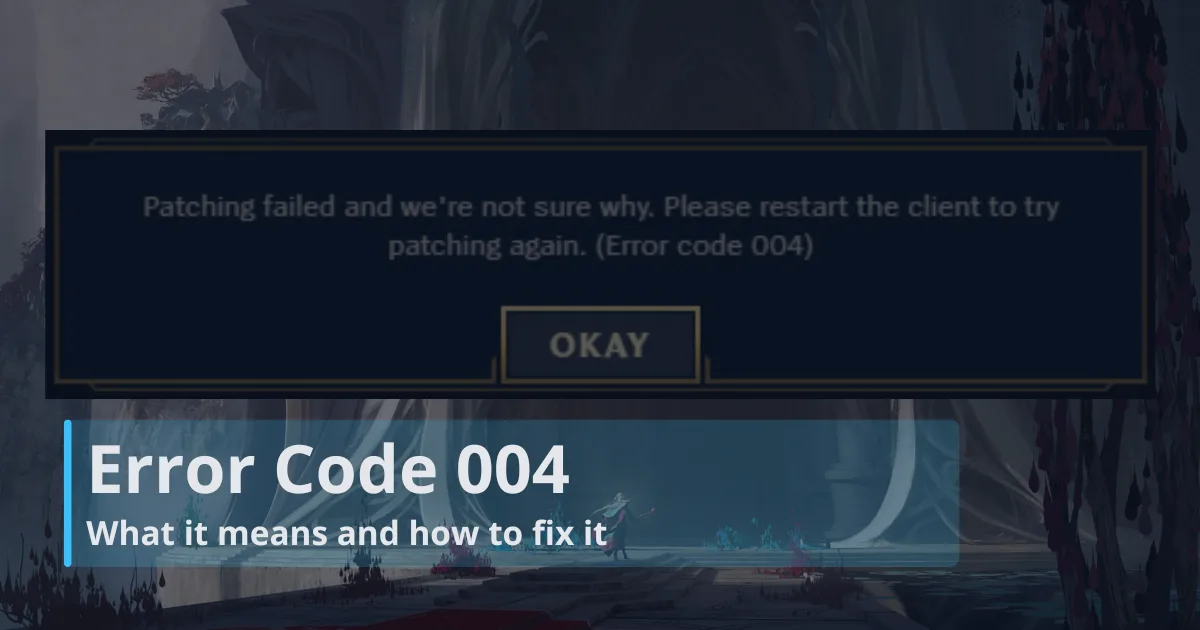
Error Code 004 means the League update got interrupted before Riot Client could finish installing it, and it has become a common issue for some players after Patch 26.15. The patch may have failed while downloading, unpacking, checking files, or replacing older League files with the new ones.
That does not usually mean your League install is broken. More often, something small is blocking the patch. Riot Client might still be open in the background, Windows might not be letting it change files, the drive might be too full, or your firewall might be stopping the client from connecting properly. It can also happen after a previous patch failed and left behind messy update files.
Do not reinstall League right away. It can work, but it is usually the slowest fix. Start with the simple steps first, then check storage, firewall settings, DNS, and local files. Save repair tools and a clean reinstall for when Error Code 004 keeps coming back.
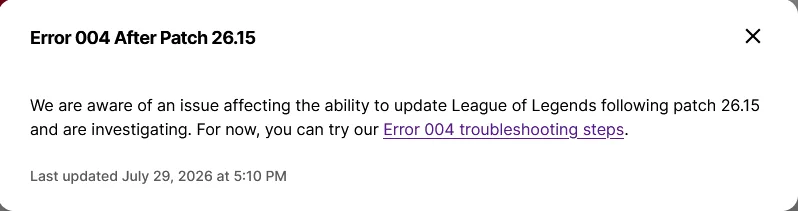
Important note for Patch 26.15: Riot has acknowledged an issue affecting some players’ ability to update League of Legends after Patch 26.15. The issue is being investigated, and Riot’s current advice is to try the standard Error 004 troubleshooting steps for now.
That means Error Code 004 may not always be caused by something on your PC. Still, the fixes below are worth trying because they cover the most common local causes, and they may get the patch moving while Riot works on the wider problem.
What Error Code 004 actually means
Error Code 004 is a League patching error. Riot Client is trying to update the game, but the patch cannot finish. You might see it right when the client opens, halfway through the update, after the progress bar freezes, or after Riot Client asks you to retry the same patch again.
Riot’s own Error Code 004 points players toward the usual fixes: restart the client, restart the PC, run Riot Client as administrator, make sure there is enough free space, check firewall access, test the connection, and reinstall if the local files are too damaged to recover.
That is also why the error feels a bit random. One player fixes it by freeing up drive space. Another fixes it by running the client as administrator. Someone else has to clear local files or reinstall. The error is the same, but the thing blocking the patch can be different from PC to PC.
Fix Error Code 004 in the right order
The best approach is to start with the fixes that take the least time and carry the least risk. If those do not work, then move down to the heavier options.
| Try this | When it helps | How disruptive it is |
|---|---|---|
| Fully close Riot Client | The patch failed once and keeps retrying | Very low |
| Restart your PC | Riot services or Windows files may be stuck | Very low |
| Fully close Vanguard, then restart | Vanguard may be stuck after the patch | Low |
| Run Riot Client as administrator | The patch downloads but will not install | Low |
| Free space on the install drive | The update stalls, rolls back, or fails mid-patch | Low |
| Add firewall and antivirus exceptions | The client cannot download or verify patch files | Medium |
| Flush DNS and check your network | The download hangs or restarts repeatedly | Medium |
| Move or delete Config and Logs folders | The same error returns after normal fixes | Medium |
| Reinstall Riot Client and League on the same drive | The install is damaged or split across drives | High |
Start with the quick, harmless fixes first. If Error Code 004 is still there after those, move on to the more involved steps.
Close Riot Client completely, not just the window
This is the fix people skip because it sounds too simple. Do not skip it. Riot Client can keep background processes alive even after the main window is gone. If one of those processes is holding a file that the patcher wants to replace, LoL Error Code 004 can keep looping.
Some players have also fixed Error Code 004 by fully closing Vanguard before restarting. Do not only end Vanguard-related processes in Task Manager. Open the Vanguard tray app, choose the option to exit or close Vanguard, then restart your PC. After Windows starts again, open Riot Client as administrator and try the patch.
This seems to help when Vanguard or one of its services is stuck in a weird state after the patch. It will not be the fix for everyone, but it is quick enough to try before moving on to heavier steps.
Here is the clean way to close it:
- Close League of Legends.
- Close Riot Client.
- Look near the Windows clock and quit Riot Client from the system tray if it is still there.
- Press Ctrl + Shift + Esc to open Task Manager.
- End anything named Riot Client, Riot Client Services, League Client, LeagueClientUx, or League of Legends.
- Open Riot Client again and let it patch.
If the patch starts normally after this, the problem was probably just a locked file from the failed update. If Error Code 004 appears again right away, reboot the PC before you try anything more serious.
Restart Windows before changing settings
A restart is not glamorous, but it clears more League patch problems than people want to admit. It resets Riot background services, releases temporary file locks, finishes pending Windows work, and gives Vanguard-related services a fresh start.
After your PC restarts, open Riot Client before anything else. Leave your VPN, overlays, game boosters, recording tools, macro software, and similar apps closed until the patch is done. If League updates normally after that, one of those background programs was probably getting in the way.
It is also worth checking Windows Update while you are here. If Windows has an update half-installed or waiting for another restart, it can leave services in a messy state. Riot Client might just be the first app that runs into the problem.
Run Riot Client as administrator
Sometimes Error Code 004 shows up even though the patch downloaded fine. The issue is that Windows will not let Riot Client replace the files inside your League folder. Running Riot Client as administrator gives it the extra permission it needs to finish the update.
Do it like this:
- Close Riot Client completely.
- Open the Start menu.
- Search for Riot Client.
- Right-click it.
- Choose Run as administrator.
- Sign in and try the League update again.
If this fixes error code 004 league of legends patching for you, the game files were probably fine. The patcher just needed permission to touch them. If you have to do this every patch, check where League is installed. Installing games inside unusual protected folders, or on a drive with messy ownership permissions, can make this error more common.
Check free space on both drives
League updates need more space than the download size suggests. The patcher may need room for the download, temporary files, unpacked files, old files being replaced, and verification data. If the drive is almost full, the update can fail even when it looks like there should technically be enough room.
Open This PC and check the drive where League of Legends is installed. Then check the Windows system drive too. This matters because Riot Client, temporary files, and Windows itself may still use the system drive even if League is installed on a separate SSD.
Easy things to clear first:
- Empty the Recycle Bin.
- Delete old installers from your Downloads folder.
- Move recordings, clips, and screenshots to another drive.
- Use Windows Storage settings to remove temporary files.
- Uninstall games you have not opened in months.
Try to leave several gigabytes free, not just a tiny sliver. A drive that is constantly sitting at the edge of full is asking for patch trouble. For wider League setup help, the RiftDaily guides section is a good place to keep bookmarked.
Let Riot Client through your firewall and antivirus
Security software can cause Error Code 004 in two ways. It can block Riot Client from connecting to patch servers, or it can interfere while the client is replacing files. Sometimes the firewall is the problem. Sometimes antivirus, ransomware protection, or a “safe files” feature is quietly locking the League folder.
Riot’s official League error codes and solutions page is worth checking when an error does not behave like a normal local patch failure, but for Error Code 004, firewall access is one of the first things to verify after the quick fixes.
In Windows Security, open Firewall and network protection, then choose Allow an app through firewall. Make sure Riot Client and League of Legends are allowed on the network you actually use. For a home connection, that is usually the private network profile.
The common files to look for are:
C:\Riot Games\League of Legends\LeagueClient.exeC:\Riot Games\League of Legends\LeagueClientUx.exeC:\Riot Games\League of Legends\LeagueClientUxRenderer.exeC:\Riot Games\League of Legends\Game\League of Legends.exeC:\Riot Games\Riot Client\RiotClientServices.exe- ¨C5C
Your paths may be different if you installed the game somewhere else. The important part is not the exact folder shown above, it is making sure your actual Riot Client, League, and Vanguard files are trusted by your security software.
You can briefly disable a firewall to test whether it is causing the problem, but do not leave it off. If the patch works while the firewall is off, turn protection back on and add proper exceptions instead.
Reset the connection if the patch gets stuck
If Riot Client starts downloading and then hangs, fails, or drops back into Error Code 004, look at the connection next. A bad DNS route, VPN, proxy, unstable Wi-Fi, or strict router setting can stop the patch from finishing cleanly.
Start with the simple network cleanup:
- Turn off any VPN or proxy.
- Restart the router if your connection has been acting up.
- Use Ethernet instead of Wi-Fi if you can.
- Open Command Prompt as administrator.
- Run
ipconfig /flushdns. - Restart Riot Client and try the patch again.
If nothing changes, try a different DNS provider for a test. Google DNS uses 8.8.8.8 and 8.8.4.4. Cloudflare DNS uses 1.1.1.1 and 1.0.0.1. Change one thing, test the patch, then decide whether to keep it. Randomly changing five network settings at once makes it harder to know what helped.
Delete or move Config and Logs folders if the local patch is dirty
If Error Code 004 keeps returning after the normal steps, the client may be tripping over bad local data. This can happen after a failed patch, a forced shutdown, a client crash, or a patch that left half-written files behind.
A common cleanup is to move the Config and Logs folders out of the League installation folder. The client can recreate these folders. Moving them to the desktop first is safer than deleting them immediately, because you can put them back if needed.
Here is the safer version:
- Close League of Legends and Riot Client.
- End any remaining Riot or League processes in Task Manager.
- Open the League folder, usually
C:\Riot Games\League of Legends. - Find the Config folder.
- Find the Logs folder.
- Move both folders to your desktop.
- Restart the PC.
- Open Riot Client as administrator and patch again.
If League updates after this, you were probably dealing with damaged local client data. You may need to adjust a few settings again, but that is still much easier than rebuilding the whole install.
Repair Windows files if the client is also crashing
If Error Code 004 is the only problem, Windows repair is not the first place to start. But if Riot Client crashes, shows missing DLL errors, refuses to open, or other games are also acting weird, it is worth checking system files.
Windows has a built-in scan for this:
- Open the Start menu.
- Search for cmd.
- Right-click Command Prompt.
- Choose Run as administrator.
- Type
sfc /scannowand press Enter. - Let the scan finish, then restart the PC.
If Windows repairs files, try Riot Client again after the restart. You can also update Windows and repair common game runtime components such as Microsoft Visual C++ Redistributables if you are seeing broader launch or runtime errors. Do not spend an hour on runtime fixes if the only symptom is a simple failed patch, though. Keep the fix matched to the problem.
The walkthrough below shows several of these fixes in a visual order, including admin mode, storage checks, runtime repair, DNS changes, and reinstalling when nothing else works.
The useful part is the order. Start with permission, space, and connection problems before assuming the League install is ruined.
Reinstall League only after the smaller fixes fail
Reinstalling League of Legends can fix Error Code 004, but it is the slow option. Use it when the patch still fails after a proper client restart, PC reboot, administrator launch, storage cleanup, firewall check, DNS reset, and local folder cleanup.
A clean reinstall is also reasonable if you moved League between drives, copied the folder from another PC, interrupted several patches in a row, or have a very old install that has survived years of client changes.
If you reinstall, keep Riot Client and League of Legends on the same drive if possible. Some players run into patching problems when Riot Client is on one drive and League is installed on another, especially if one drive has less space, different permissions, or stricter security rules. A clean install on one stable drive removes that extra point of failure.
For the cleanest reinstall:
- For the cleanest reinstall:
- Uninstall League of Legends from Windows settings.
- Uninstall Riot Client if it remains listed separately.
- Restart the PC.
- Download the latest installer from Riot’s official site.
- Install Riot Client and League of Legends on the same drive if possible.
- Choose a drive with plenty of free space.
- Run Riot Client as administrator for the first update.
- Allow Riot Client, League, and Vanguard through your security software if prompted.
If you reinstall and Error Code 004 still appears, the cause is probably outside the League folder. Look again at firewall rules, antivirus protection, DNS, VPN software, drive health, or Windows permissions.
What if Riot Client and League are on different drives?
This setup can work, but it adds more places for a patch to fail. Riot Client might live on your C drive while League is installed on a second SSD. If one drive is full, one folder has odd permissions, or one drive is being scanned harder by antivirus software, the patch can still break.
Check both locations. Make sure both drives have space. Make sure the folders are not read-only. If the issue started after moving files around manually, stop trying to patch the moved folder forever. A clean reinstall to one stable location is usually less painful.
When the problem might be on Riot’s side
Most Error Code 004 fixes are local, but there are times when a fresh patch causes problems for a lot of players at once. If the error appears right after a League update and social channels are full of similar reports, do the safe steps only. Restart, check space, run as administrator, and avoid deleting half your install while Riot services are shaky.
If your setup was working yesterday and breaks the moment a patch goes live, it is worth checking Riot’s support channels before doing a full reinstall. A server-side or patch rollout issue will not be fixed by reinstalling the game six times.
Small mistakes that waste the most time
Error Code 004 is annoying, and that makes it easy to overreact. These are the mistakes that usually turn a fixable patch issue into an evening-long mess.
- Reinstalling first. It can work, but it is slow and often unnecessary.
- Only closing the Riot Client window. Background processes can still hold files open.
- Ignoring the system drive. League may be on another drive, but Windows and Riot temp files can still need C drive space.
- Leaving the firewall off. Test with it if needed, then turn it back on and add exceptions.
- Deleting random Riot folders. Move Config and Logs if needed, but do not gut the install blindly.
- Trying ten fixes at once. Change one thing, test, then move on.
If you are dealing with more than one League issue at the same time, use the RiftDaily troubleshooting hub after this guide. Client errors are easier to solve when you separate patch problems from launch problems, Vanguard problems, and connection problems.
Frequently asked questions about Error Code 004
What is Error Code 004 in League of Legends?
Error Code 004 is League’s way of saying the update did not go through. The Riot Client tried to patch the game, but something stopped it before the new files were fully in place. That “something” is usually pretty ordinary: a Riot process that never closed, a drive running low on space, Windows blocking file changes, security software interrupting the patch, or leftover files from a previous failed update.
What is the fastest way to fix LoL Error Code 004?
Start with a clean Riot Client restart. Close the client, open Task Manager, and end any Riot or League processes that are still running. Then restart your PC and launch Riot Client as administrator. It sounds basic, but this clears the two most common problems behind the error: stuck files and Windows permission blocks.
Can low storage cause error code 004 league of legends updates?
Yes. League patches need space for temporary files, unpacked files, verification, and replacement files. If the League drive or Windows system drive is almost full, Error Code 004 can appear during the patch.
Can antivirus or firewall software cause Error Code 004?
Yes. Security software can block Riot Client from downloading patch files or stop it from replacing files during the update. Add Riot Client, League of Legends, and Vanguard to the allowed list instead of leaving your firewall disabled.
Should I delete the Config and Logs folders?
Moving the Config and Logs folders out of the League installation folder can help if local client data is corrupted. Close Riot Client first, move the folders to your desktop as a backup, restart, then try patching again.
Does changing DNS help with Error Code 004?
It can, but only if the update is failing because the client cannot keep a steady connection to Riot’s patch servers. Try flushing DNS first with ipconfig /flushdns from an administrator Command Prompt. If the download still hangs or keeps failing, switch to a well-known DNS provider and test the patch again.
Do I need to reinstall League of Legends?
Not unless the smaller fixes do nothing. A reinstall takes longer and will not help much if the real issue is your firewall, storage, or a stuck Riot process. Close the client properly, restart the PC, run Riot Client as administrator, clear some drive space, check security software, reset the connection, and move the Config and Logs folders first. If Error Code 004 still will not go away, then reinstalling is worth it.
What should I send Riot Support if nothing works?
Send the logs, a screenshot of Error Code 004, and a short note explaining where the update fails. Also tell them where League is installed and what fixes you already tried. That gives support something useful to work with instead of starting from zero.
Get League patching again without the guesswork
Error Code 004 looks worse than it usually is. In most cases, League is not broken beyond repair, the patcher is just being blocked by something simple. Start with the boring fixes: close Riot Client all the way, restart Windows, run the client as administrator, free up space, and check the firewall. If the update still refuses to go through, then try DNS, move Config and Logs, repair Windows if the client is crashing, and reinstall only when the install really seems damaged.
For more help with League errors, keep the RiftDaily troubleshooting hub nearby. If you want more general setup and client help after fixing the patch, browse the RiftDaily guides section next.